
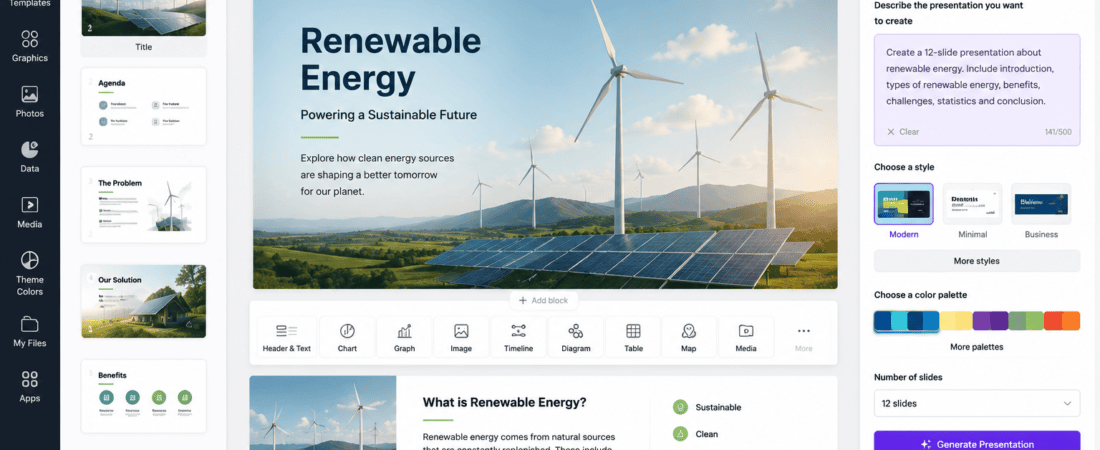
AI Tools for Generating Presentation Introduction
AI Tools for Generating Presentation: Creating professional presentations used to take hours of research, writing, designing, and formatting. Whether you were preparing a business pitch, school assignment, marketing proposal, or conference presentation, building attractive slides often required advanced design skills and software like Microsoft PowerPoint or Google Slides.
Today, artificial intelligence (AI) has transformed the presentation creation process. Modern AI presentation tools can generate complete slide decks from a simple text prompt within minutes. These tools automatically organize information, create layouts, suggest visuals, generate icons, and apply professional design themes.
The best part is that many of these AI presentation makers offer free plans, making them accessible to students, educators, marketers, entrepreneurs, freelancers, and business professionals.
In this guide, you’ll discover the best free AI tools for generating presentation slides from text, compare their features, and learn how to create stunning presentations quickly.
Why Use AI Presentation Generators?
AI presentation tools simplify the entire design process.
Instead of spending hours creating slides manually, you simply describe your topic, and AI builds a structured presentation automatically.
Benefits of AI Presentation Makers
- Save hours of work
- Create professional layouts instantly
- Generate presentation content
- Design visually appealing slides
- Produce charts and icons automatically
- Improve consistency across slides
- No graphic design experience required
- Easy collaboration with teams
These tools help users focus on ideas instead of formatting.
How AI Presentation Generators Work
AI presentation tools use natural language processing (NLP) and machine learning to understand your prompt.
For example, if you enter:
“Create a 10-slide presentation about renewable energy.”
The AI can automatically:
- Generate a title slide
- Build an agenda
- Create informative sections
- Suggest images and icons
- Design matching layouts
- Apply fonts and color schemes
- Add conclusion and summary slides
Many tools also allow further customization after the presentation is generated.
Who Can Benefit from AI Presentation Tools?
AI presentation software is useful for many different users.
Students
Create class assignments, research presentations, and project reports quickly.
Teachers
Prepare engaging lessons and classroom presentations with less effort.
Business Professionals
Design sales pitches, investor decks, company reports, and client proposals.
Marketers
Create campaign presentations, social media reports, and marketing strategies.
Freelancers
Deliver polished client presentations in less time.
Entrepreneurs
Build startup pitch decks and product presentations without hiring designers.
Features to Look For
When choosing an AI presentation generator, consider the following:
- Text-to-slide generation
- Attractive templates
- AI-generated visuals
- Charts and infographics
- Collaboration features
- Export to PowerPoint or PDF
- Google Slides compatibility
- Free usage limits
- Custom branding options
- AI writing assistance
Best Free AI Presentation Tools
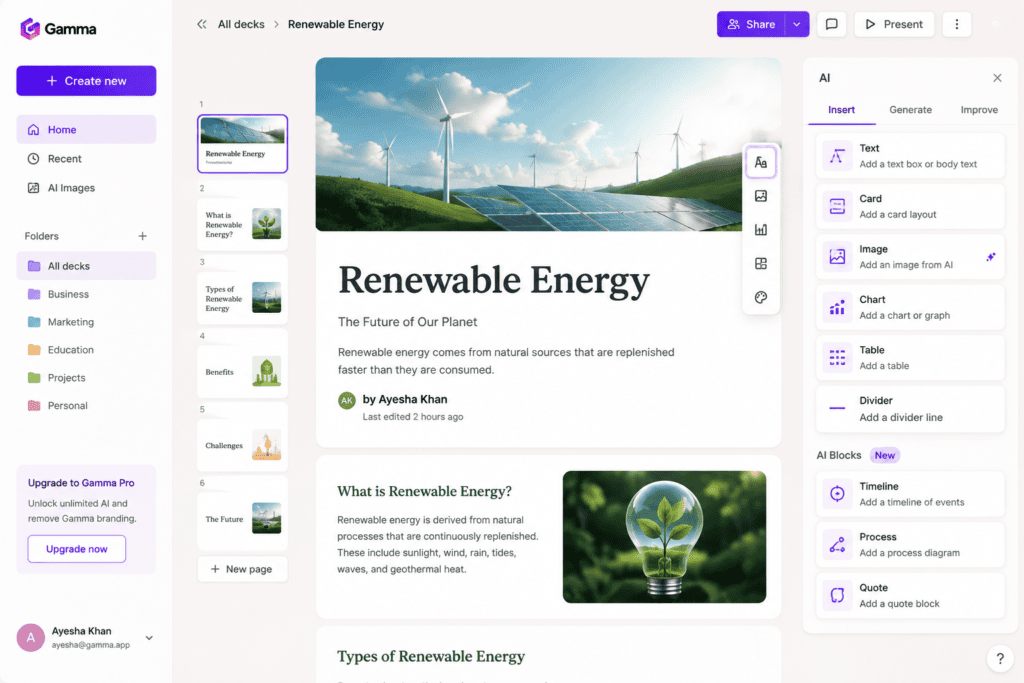
1. Gamma
Gamma has quickly become one of the most popular AI presentation platforms because it creates modern, interactive presentations from simple prompts.
Features
- AI presentation generation
- Interactive layouts
- Professional templates
- AI writing assistance
- Charts and diagrams
- Web sharing
- PowerPoint export
Pros
- Beautiful modern designs
- Very easy to use
- Fast generation
- Excellent for business presentations
Cons
- Limited free credits
- Some export options require premium access
Best For
- Business presentations
- Startup pitch decks
- Marketing proposals
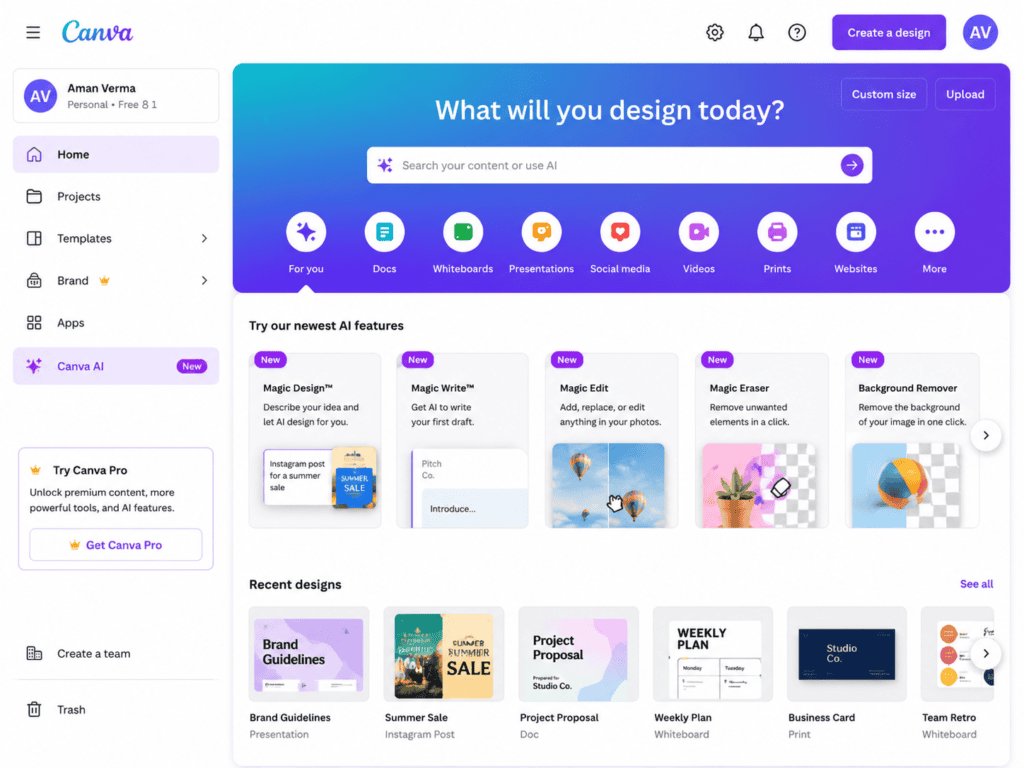
2. Canva AI Presentation Maker
Canva combines AI-generated content with thousands of presentation templates, making it one of the easiest tools for beginners.
Features
- AI presentation generation
- Magic Design
- Drag-and-drop editing
- Stock images
- Icons
- Animations
- Collaboration
Pros
- Huge template library
- Beginner-friendly
- Excellent editing tools
- Cloud-based
Cons
- Some premium assets require Canva Pro
- Advanced AI features have usage limits
Best For
- Students
- Teachers
- Social media marketers
3. Microsoft Copilot for PowerPoint
Microsoft Copilot integrates directly into PowerPoint, helping users generate presentations using natural language prompts.
Features
- AI slide generation
- Speaker notes
- Automatic layouts
- Smart summaries
- PowerPoint integration
- Design suggestions
Pros
- Familiar PowerPoint workflow
- High-quality formatting
- Strong productivity features
Cons
- Requires Microsoft ecosystem access
- Some features are limited to paid plans
Best For
- Corporate users
- Office professionals
- Existing Microsoft 365 users
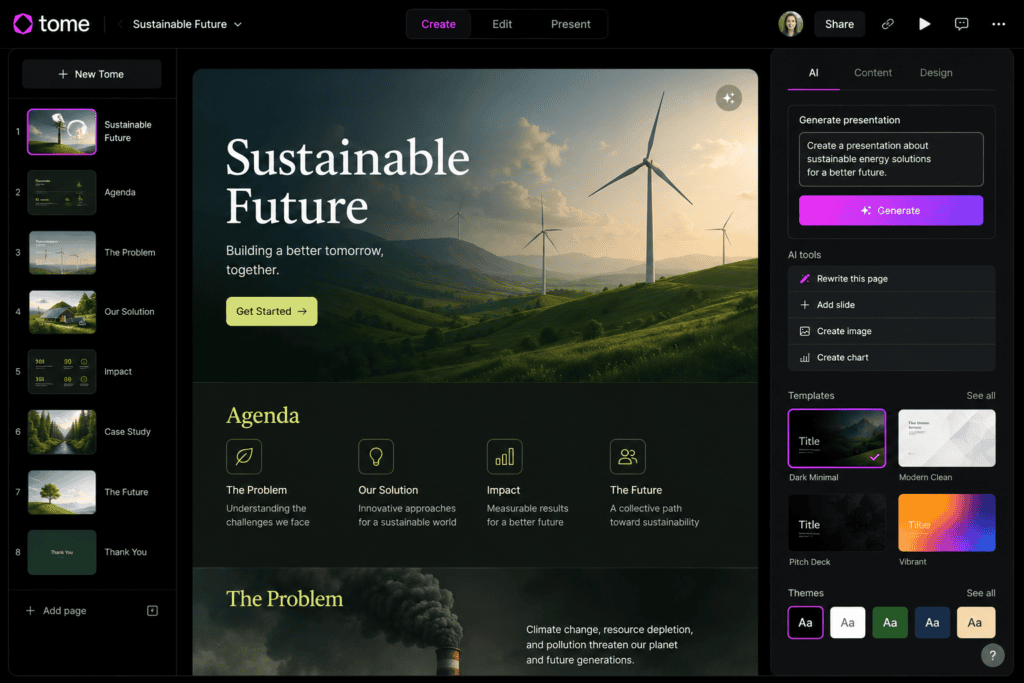
4. Tome AI
Tome AI focuses on storytelling, making it an excellent option for narrative presentations and creative pitches.
Features
- AI storytelling
- Multimedia support
- Interactive pages
- AI image generation
- Presentation sharing
Pros
- Excellent visual storytelling
- Beautiful layouts
- Easy collaboration
Cons
- Limited free usage
- Premium features available only on paid plans
Best For
- Creative professionals
- Designers
- Startup founders
5. Beautiful.ai
Beautiful.ai automatically adjusts layouts while you build your presentation, ensuring every slide maintains a polished, professional appearance.
Features
- Smart layouts
- AI design assistance
- Business templates
- Collaboration
- Charts
- Icons
Pros
- Consistent design
- Easy editing
- Professional appearance
Cons
- Limited free access
- Some export options require payment
Best For
- Business reports
- Investor presentations
- Corporate meetings
Why AI Presentation Tools Are Growing in Popularity
More professionals are adopting AI because it significantly reduces the time spent on repetitive tasks like formatting, choosing layouts, and arranging visuals. Instead of starting with a blank slide, users receive a complete draft that they can refine to match their needs.
Whether you’re creating a classroom presentation or a business proposal, AI helps you produce visually engaging slides faster without compromising quality.
6. Slidesgo AI Presentation Maker
Slidesgo is well known for its professionally designed presentation templates. Its AI Presentation Maker allows users to generate complete slide decks from a text prompt in just a few minutes.
Features
- AI-generated presentations
- Thousands of templates
- Google Slides support
- PowerPoint compatibility
- AI writing assistance
- Educational templates
Pros
- Beginner-friendly
- Large template collection
- Easy customization
- Free templates available
Cons
- Some premium templates require a subscription
- AI generation limits on the free plan
Best For
- Students
- Teachers
- Educational presentations
7. Presentations.AI
Presentations.AI is an AI-first platform built specifically for creating visually appealing presentations with minimal effort.
Features
- AI slide generation
- Smart layouts
- Brand customization
- Team collaboration
- Automatic formatting
- Cloud storage
Pros
- Excellent automation
- Modern interface
- Responsive slide layouts
Cons
- Limited free credits
- Some collaboration features require a paid plan
Best For
- Marketing teams
- Business professionals
- Startup founders
8. Plus AI
Plus AI integrates with Google Slides and Microsoft PowerPoint, making it easy to create and edit presentations within tools users already know.
Features
- AI-generated presentations
- Google Slides integration
- PowerPoint support
- Prompt-based editing
- AI rewriting
- Presentation templates
Pros
- Familiar workflow
- Fast editing
- Strong integration
Cons
- Limited free trial
- Advanced features require a subscription
Best For
- Google Workspace users
- Office professionals
- Team collaboration
9. Visme AI Presentation Generator
Visme combines AI-generated content with professional design tools to help users create presentations, reports, and infographics.
Features
- AI slide generation
- Charts
- Infographics
- Icons
- Stock photos
- Collaboration
Pros
- Excellent design quality
- Strong visualization tools
- Business-friendly
Cons
- Export limitations on free plans
- Premium templates available
Best For
- Business reports
- Data presentations
- Marketing proposals
10. Simplified AI Presentation Maker
Simplified is an all-in-one AI platform offering presentation generation, content writing, image creation, and social media design.
Features
- AI presentation creator
- AI writing assistant
- AI image generation
- Team collaboration
- Brand kits
- Cloud editing
Pros
- Multiple AI tools in one platform
- Easy interface
- Fast workflow
Cons
- Free plan includes usage limits
- Some exports require a premium account
Best For
- Content creators
- Marketing agencies
- Freelancers
Comparison Table
| AI Tool | Free Plan | PowerPoint Export | Google Slides Support | Best For |
|---|---|---|---|---|
| Gamma | ✅ | ✅ | Limited | Business presentations |
| Canva AI | ✅ | ✅ | Yes | Beginners |
| Microsoft Copilot | Limited | ✅ | No | Office users |
| Tome AI | ✅ | Limited | Storytelling | |
| Beautiful.ai | Limited | ✅ | No | Business reports |
| Slidesgo AI | ✅ | ✅ | ✅ | Students |
| Presentations.AI | ✅ | Yes | Limited | Teams |
| Plus AI | Trial | ✅ | ✅ | Google Workspace |
| Visme AI | ✅ | Limited | Data visualization | |
| Simplified AI | ✅ | Yes | Limited | Content creators |
How to Generate Presentation Slides from Text
Creating AI-powered presentations is straightforward. Most tools follow a similar workflow.
Step 1: Choose Your AI Tool
Select a presentation generator that fits your needs. For example:
- Gamma for modern business decks
- Canva AI for ease of use
- Slidesgo for education
- Tome AI for storytelling
- Visme for reports
Step 2: Write a Detailed Prompt
A well-written prompt produces better results.
Example Prompt
Create a 12-slide presentation about the benefits of renewable energy for businesses. Include an introduction, statistics, case studies, challenges, solutions, and a conclusion. Use a modern blue and green theme with icons.
The more details you provide, the better the AI can structure the presentation.
Step 3: Let the AI Generate the Slides
After entering your prompt, the AI typically creates:
- Title slide
- Agenda
- Main content sections
- Images and icons
- Charts (when applicable)
- Summary slide
- Thank-you or Q&A slide
Most presentations are generated within a few minutes.
Step 4: Customize the Design
Although AI creates a strong first draft, you should personalize it by:
- Updating the color palette
- Changing fonts
- Replacing stock images
- Adding your logo
- Editing speaker notes
- Refining slide transitions
This helps align the presentation with your brand or audience.
Step 5: Review the Content
Always check:
- Grammar and spelling
- Data accuracy
- Image relevance
- Consistent formatting
- Readability
- Flow between slides
AI-generated content may require small edits for clarity and accuracy.
Step 6: Export the Presentation
Most AI tools allow you to export presentations in formats such as:
- PPTX (PowerPoint)
- Google Slides
- Shareable web links
Choose the format that best suits your presentation environment.
Tips for Better AI Presentation Prompts
To improve the quality of generated slides:
- Specify the number of slides.
- Mention the target audience.
- Define the presentation goal.
- Include preferred colors.
- Request icons or illustrations.
- Ask for charts where appropriate.
- Mention the desired tone (professional, educational, or creative).
- Specify the output language if needed.
Detailed prompts often result in more polished presentations.
Advantages of AI Presentation Tools
AI presentation makers provide several benefits:
Save Time
Generate complete presentations in minutes instead of hours.
Professional Designs
Access polished layouts without needing graphic design skills.
Improved Productivity
Focus on research and delivery rather than formatting.
Collaboration
Many platforms support real-time collaboration for teams.
Easy Editing
Refine AI-generated content with intuitive drag-and-drop editors.
Limitations of AI Presentation Tools
While AI presentation generators are powerful, they have some limitations:
- Free plans often include usage limits.
- Some export formats require premium access.
- AI-generated content should always be fact-checked.
- Highly specialized topics may require manual adjustments.
- Visual choices may not always match your brand guidelines.
Reviewing and refining the presentation before sharing is always recommended.
Common Mistakes to Avoid
Although AI presentation generators save time, a few common mistakes can reduce the quality of your final presentation.
1. Using Vague Prompts
Short prompts such as “Create a marketing presentation” often produce generic slides. Instead, provide details about your audience, goals, number of slides, and preferred design style.
Better Example
Create a 12-slide presentation about digital marketing trends for small businesses. Include statistics, case studies, SEO, social media, AI marketing tools, and a conclusion. Use a modern blue theme with icons and simple charts.
2. Not Reviewing AI-Generated Content
AI can occasionally generate outdated or inaccurate information. Always verify facts, statistics, and examples before presenting.
3. Overloading Slides with Text
Presentations should communicate ideas clearly. Keep each slide concise by using:
- Bullet points
- Icons
- Charts
- Images
- Infographics
Avoid large paragraphs that overwhelm your audience.
4. Ignoring Visual Consistency
Maintain the same:
- Font family
- Color palette
- Icon style
- Image quality
- Slide spacing
Consistent visuals create a more professional presentation.
5. Skipping Practice
Even if AI creates excellent slides, practicing your delivery is essential. Familiarity with your content improves confidence and audience engagement.
Expert Tips for Better AI Presentations
Start with an Outline
Define the presentation structure before generating slides. A clear outline helps AI organize information logically.
Use High-Quality Visuals
Replace generic images with relevant photos, screenshots, or custom graphics when appropriate.
Limit Text Per Slide
Aim for concise bullet points rather than long paragraphs to keep the audience focused.
Add Data Visualizations
Charts, graphs, and infographics make statistics easier to understand and more engaging.
Customize the AI Output
Treat the AI-generated presentation as a first draft. Personalize layouts, visuals, and messaging to match your goals and branding.
Best Use Cases for AI Presentation Tools
AI presentation generators are useful in many situations.
Education
- Classroom lessons
- Student assignments
- Research projects
- Thesis presentations
Business
- Sales presentations
- Investor pitch decks
- Company reports
- Team meetings
Marketing
- Campaign proposals
- Client presentations
- SEO reports
- Social media strategies
Training
- Employee onboarding
- Workshops
- Online courses
- Product demonstrations
Personal Projects
- Portfolio presentations
- Event planning
- Community talks
- Personal branding
AI Presentation Tools vs Traditional Presentation Software
| Feature | AI Presentation Tools | Traditional Software |
|---|---|---|
| Automatic slide creation | ✅ | ❌ |
| AI content generation | ✅ | ❌ |
| Professional templates | ✅ | ✅ |
| Manual design required | Minimal | Extensive |
| Collaboration | ✅ | ✅ |
| Time required | Minutes | Hours |
| Learning curve | Easy | Moderate |
| Customization | High | Very High |
AI tools are ideal for quickly creating polished presentations, while traditional software provides more granular design control for advanced users.
Frequently Asked Questions (FAQs)
1. What is an AI presentation generator?
An AI presentation generator is a tool that creates presentation slides automatically from a text prompt using artificial intelligence. It can generate content, layouts, and visual elements in minutes.
2. Are AI presentation tools free?
Many platforms offer free plans with daily credits, limited exports, or feature restrictions. Paid plans typically unlock advanced templates, higher usage limits, and premium export options.
3. Which AI presentation tool is best?
The best choice depends on your needs:
- Gamma: Modern business presentations
- Canva AI: Beginners and education
- Tome AI: Storytelling and creative pitches
- Slidesgo AI: Students and teachers
- Visme AI: Data-heavy reports
- Beautiful.ai: Corporate presentations
4. Can AI generate PowerPoint slides?
Yes. Many AI presentation makers allow you to export presentations in PPTX format for Microsoft PowerPoint.
5. Can AI create Google Slides?
Some AI tools integrate directly with Google Slides or let you export presentations for further editing.
6. Do I need design experience?
No. AI presentation tools are designed for users of all skill levels and automatically apply layouts, typography, and color schemes.
7. Can AI add images and icons?
Yes. Most AI presentation platforms suggest or generate relevant visuals, icons, and illustrations based on your prompt.
8. Can I edit AI-generated presentations?
Absolutely. You can modify text, rearrange slides, change colors, replace images, and adjust layouts after generation.
9. Are AI presentations suitable for professional meetings?
Yes, provided you review the content, verify facts, and customize the slides to align with your organization’s branding and messaging.
10. Will AI replace presentation designers?
AI accelerates the creation process but does not replace human creativity. Designers still play a vital role in branding, storytelling, and producing highly customized presentations.
Final Thoughts
AI presentation generators have transformed the way people create slides. Instead of spending hours designing from scratch, you can now generate structured, visually appealing presentations in just a few minutes.
Whether you’re a student preparing an assignment, a teacher developing lesson materials, or a business professional creating a client proposal, AI tools can help you work more efficiently. The key is to use detailed prompts, review the generated content, and personalize the final presentation before sharing it.
As AI technology continues to improve, presentation creation will become even faster, smarter, and more collaborative.
Conclusion
Free AI presentation tools make it easier than ever to turn ideas into polished slide decks. With features such as text-to-slide generation, smart layouts, AI writing assistance, and built-in design templates, these platforms help users produce professional presentations with minimal effort.
Experiment with different AI presentation makers to find the one that fits your workflow. By combining AI automation with your own expertise and creativity, you can create presentations that are informative, visually engaging, and impactful.
Check out here if you want to know about How to Design Custom Sticker Packs Using Free AI Art Tools