
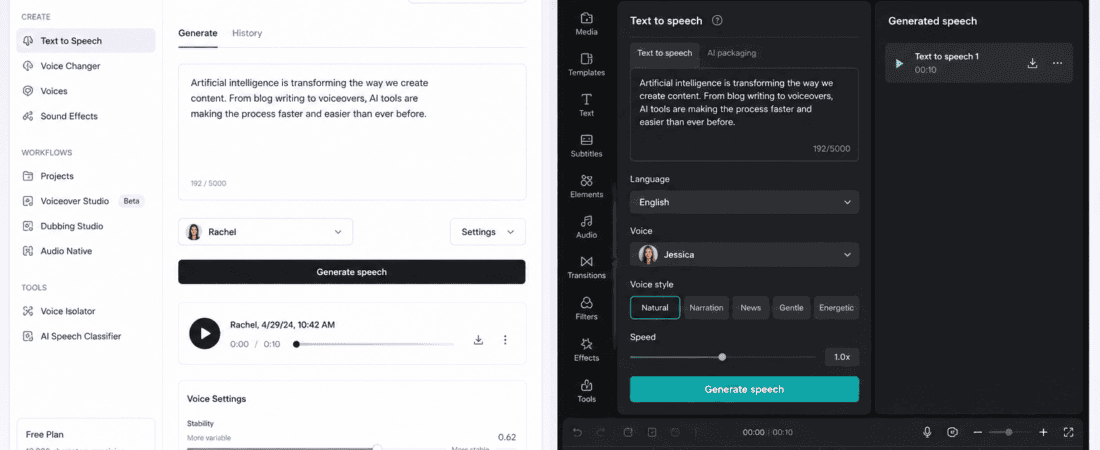
ElevenLabs free tier vs CapCut text to speech: AI voice technology has changed the way creators make videos.
A few years ago, creating a professional voiceover usually meant recording yourself, hiring a voice actor, or spending time cleaning up audio in an editing program. Today, you can type a script, choose a voice, and generate spoken audio within minutes.
Two tools that often come up when creators look for AI text-to-speech are ElevenLabs and CapCut.
At first glance, they seem to do the same thing. Both can turn written text into spoken audio. Both are useful for videos. Both have AI-powered voice features. And both can be used without buying expensive professional voice-recording equipment.
But after using them for different types of content, the difference becomes much clearer.
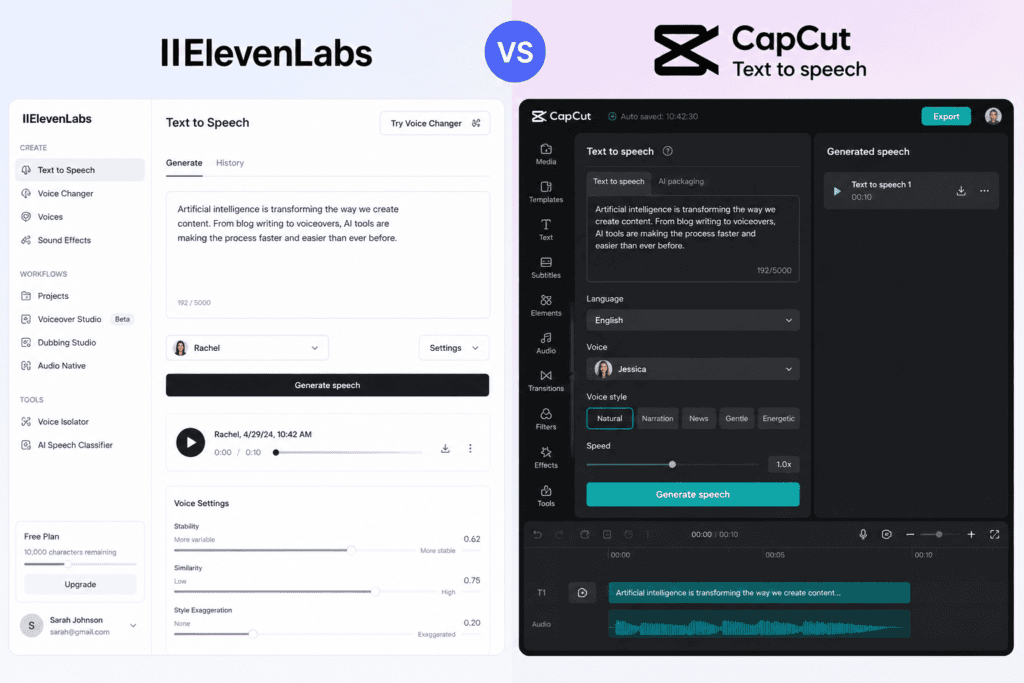
ElevenLabs is primarily focused on high-quality AI voice generation, while CapCut treats text-to-speech as one part of a larger video-editing workflow.
That distinction matters.
If your main goal is to create the most natural-sounding AI voice possible, ElevenLabs is usually the stronger option. If your goal is to quickly create a complete social media video with captions, transitions, music, effects, and an AI voice in the same editor, CapCut can be much more convenient.
In this guide, I’ll compare the ElevenLabs free tier vs CapCut text to speech based on voice quality, naturalness, languages, pronunciation, editing workflow, ease of use, free access, creator experience, and different use cases.
ElevenLabs Free Tier vs CapCut Text to Speech at a Glance
| Feature | ElevenLabs | CapCut |
|---|---|---|
| Main purpose | AI voice generation | Video editing + AI tools |
| Text-to-speech | Excellent | Excellent |
| Natural voice quality | Excellent | Very good |
| Voice variety | Strong | Strong |
| Video editing | Limited compared with CapCut | Excellent |
| Captions | Not its main strength | Excellent |
| Social media workflow | Good | Excellent |
| Voice customization | Strong | Good |
| Pronunciation control | Strong | Good |
| Multilingual support | Strong | Strong |
| Beginner friendliness | Very good | Excellent |
| Free option | Yes, with limits | Yes, with feature/account limits |
| Best for voiceovers | ElevenLabs | CapCut |
| Best for complete videos | CapCut | CapCut |
| Best for voice realism | ElevenLabs | — |
| Best for TikTok/Reels | — | CapCut |
| Best for narration | ElevenLabs | CapCut |
| Best for quick editing | — | CapCut |
One important warning: free-tier limits and available voices/features can change over time, so the exact number of characters, credits, voices, or premium functions should always be checked on the current product pages before making a decision.
What Is ElevenLabs?
ElevenLabs is an AI audio platform best known for generating realistic synthetic voices.
Unlike traditional text-to-speech systems that can sometimes sound stiff or mechanical, ElevenLabs focuses heavily on natural-sounding speech.
You can enter a script and generate a voiceover that includes natural pauses, changes in emphasis, and more realistic vocal delivery.
This makes the platform particularly interesting for:
- YouTube narration
- Storytelling
- Audiobooks
- Educational videos
- Documentary-style content
- Podcasts
- Social media narration
- Character voices
- Marketing videos
- Explainer videos
The biggest thing I noticed when testing ElevenLabs is that the platform feels like it was designed around the voice itself.
That’s important.
The voice isn’t simply an extra feature attached to a video editor.
It is the main product.
My Experience With ElevenLabs
When I first approached ElevenLabs, what stood out was how quickly I could turn a written paragraph into something that actually sounded like spoken language.
With some AI voice tools, I find myself mentally correcting the voice while listening.
A sentence might be grammatically correct but still sound like a machine reading words from a page.
ElevenLabs generally does a better job of making the delivery feel conversational.
For example, if I give it a short narration such as:
“The internet has completely changed the way small businesses reach customers.”
I don’t want every word pronounced with exactly the same rhythm.
I want the sentence to feel like someone is actually explaining something.
That’s where ElevenLabs becomes impressive.
The voice quality is one of the biggest reasons I’d consider it when the voiceover itself is the most important part of the project.
What Is CapCut Text to Speech?
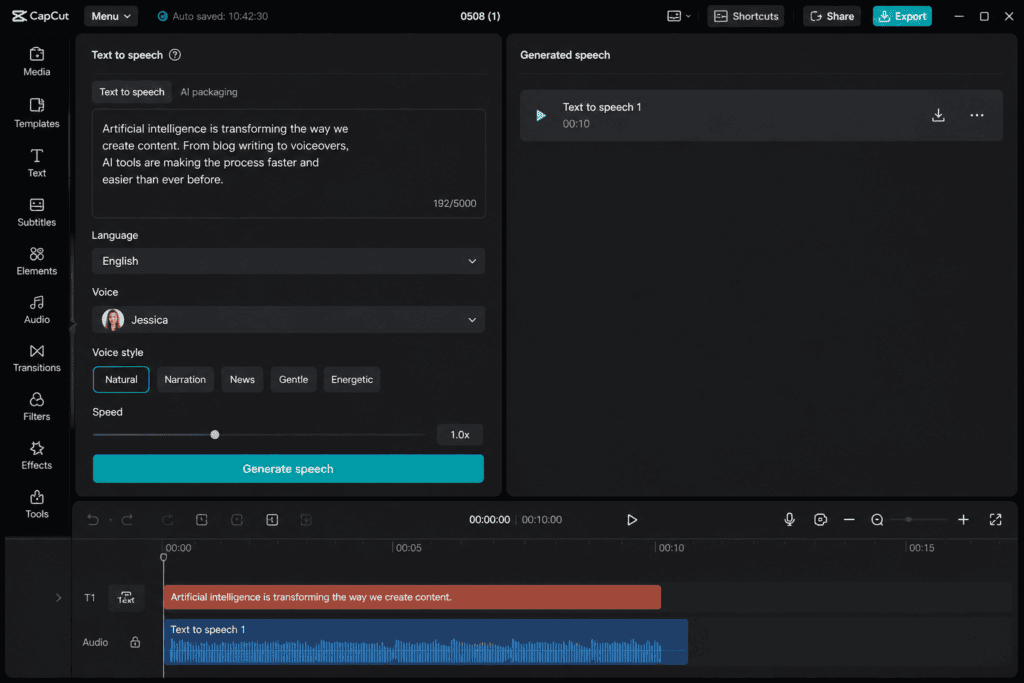
CapCut is primarily a video editing platform, but it includes AI-powered text-to-speech features that allow users to turn written scripts into voiceovers.
The biggest difference from ElevenLabs is the surrounding workflow.
With CapCut, I can:
- Import my video.
- Add text.
- Generate an AI voice.
- Add automatic captions.
- Add music.
- Add transitions.
- Add effects.
- Adjust timing.
- Export the final video.
I don’t have to move between multiple applications.
That’s incredibly convenient for social media creators.
If I’m making a 30-second Instagram Reel, TikTok, or YouTube Short, I often care less about having the absolute best possible AI voice and more about finishing the entire video quickly.
That’s where CapCut becomes extremely practical.
My Experience With CapCut Text to Speech
My favorite thing about CapCut’s text-to-speech workflow is its simplicity.
I can be inside a project and realize:
This video needs a voiceover.
Instead of opening another platform, generating an audio file, downloading it, importing it, synchronizing it and then editing it, I can create the voiceover directly inside the project.
That saves time.
For a social media manager producing several short videos, this difference can become significant.
Let’s say I’m creating five Reels for a brand.
With CapCut, I can keep the entire process in one timeline.
That convenience sometimes matters more than having the most sophisticated voice model available.
Voice Quality: ElevenLabs vs CapCut
This is probably the biggest question.
Which one sounds more realistic?
In my experience, ElevenLabs has the advantage when realistic voice quality is the priority.
Its voices can sound expressive and conversational, particularly when the script is written naturally.
CapCut’s AI voices have improved considerably and can sound very good for social content, tutorials, promotional clips and short videos.
However, when I listen specifically for subtle details such as:
- Pauses
- Emotional delivery
- Sentence rhythm
- Emphasis
- Conversational flow
- Pronunciation
ElevenLabs usually feels more specialized.
Winner: ElevenLabs
Which One Sounds More Human?
This depends partly on the script.
A common mistake is blaming the AI voice when the real problem is the writing.
For example:
“Today we will discuss the five important benefits associated with artificial intelligence.”
This sounds formal and robotic even when spoken by a high-quality voice.
Compare it with:
“So, what are the five biggest benefits of using AI?”
The second sentence is naturally conversational.
I get much better results from ElevenLabs when I write scripts the way people actually speak.
CapCut benefits from the same principle.
Winner: ElevenLabs
Voice Variety
Both platforms offer multiple voice choices, but their approach is different.
ElevenLabs has built a large voice ecosystem around AI-generated speech and voice-related features.
CapCut offers a range of text-to-speech voices designed primarily for content creation.
For social media, I often don’t need dozens of highly specialized voices.
I just need:
- A natural female voice
- A natural male voice
- A younger energetic voice
- A calm narrator
- A promotional voice
- Maybe a few fun or character-style options
CapCut can be more than enough for those situations.
Winner: ElevenLabs for voice-focused variety
Winner: CapCut for quick creator access
ElevenLabs vs CapCut for TikTok Videos
If I’m making a TikTok from scratch, CapCut is extremely convenient.
I can create the voiceover and immediately:
- Add captions
- Add stickers
- Add animations
- Add music
- Adjust clips
- Add effects
- Format the video vertically
That makes the process very fast.
ElevenLabs can create the voiceover, but I’d still need a video editor afterward.
Winner: CapCut
ElevenLabs vs CapCut for YouTube Videos
For long-form YouTube narration, I would lean toward ElevenLabs.
Imagine creating a 10-minute documentary-style video.
The voice becomes one of the most important elements.
If the narration sounds natural throughout the entire video, viewers are less likely to notice that it was AI-generated.
I’d generate the voice in ElevenLabs and then edit the video separately.
For a simple YouTube Short, however, CapCut may be faster.
Winner: ElevenLabs for long-form narration
ElevenLabs vs CapCut for Reels
For Instagram Reels, CapCut is extremely convenient.
The workflow is basically:
Script → AI voice → video clips → captions → music → effects → export
That is exactly what short-form creators need.
ElevenLabs may produce the better voice, but you still need another editor.
Winner: CapCut
ElevenLabs vs CapCut for Narration
Narration is where ElevenLabs really makes sense.
If the project depends heavily on the voice, I’d rather spend extra time generating the best possible voiceover.
This applies to:
- Documentaries
- Story videos
- Educational videos
- Audiobook-style content
- History videos
- Financial explainers
- Tutorials
- Long-form YouTube content
Winner: ElevenLabs
Language Support
Both platforms support multiple languages, but exact language and voice availability can vary by feature, model and account.
If you’re creating multilingual content, don’t simply choose a platform based on the number of languages listed on its homepage.
Test the languages you actually need.
For example, if your audience speaks:
- English
- Urdu
- Hindi
- Arabic
generate a short sample in each language.
Listen carefully to:
- Accent
- Pronunciation
- Sentence rhythm
- Names
- Numbers
- Local words
A tool can technically “support” a language while still producing pronunciation that doesn’t sound natural for your audience.
Winner: Depends on your language requirements
Pronunciation: Which Tool Performs Better?
Pronunciation becomes particularly important when your script contains:
- Company names
- People’s names
- Product names
- Technical terms
- Abbreviations
- Foreign words
- Locations
This is one reason I prefer testing a voice before committing to a long script.
I don’t want to generate a 10-minute voiceover and discover afterward that the AI pronounced the brand name incorrectly in every section.
ElevenLabs generally provides stronger voice-focused controls, making it more attractive when pronunciation and voice behavior need careful attention.
CapCut is easier when the goal is simply to produce the video quickly.
Winner: ElevenLabs
Which Tool Is Easier for Beginners?
This is where CapCut wins.
If someone has never used an AI voice platform before, CapCut can feel familiar because it’s fundamentally a video editor.
You are already looking at:
- Timeline
- Clips
- Text
- Audio
- Effects
Adding text-to-speech doesn’t require learning a completely separate production workflow.
ElevenLabs is also relatively easy to understand, but its interface is more focused on generating and managing audio.
Winner: CapCut
Free Tier Comparison
Both tools have free access options, but “free” doesn’t mean unlimited.
AI voice generation costs computing resources, so free accounts typically have limitations.
Those limitations can include:
- Character limits
- Generation limits
- Available voices
- Export restrictions
- Premium features
- Commercial usage conditions
- Monthly quotas
ElevenLabs’ free plan has historically provided a limited amount of monthly text-to-speech usage, while paid plans expand the available usage and features.
CapCut also provides free text-to-speech capabilities, although access to specific voices and AI features can vary depending on platform, region, account and current product configuration.
Because these limits change, I wouldn’t choose a tool solely because someone says:
“This tool is free.”
Instead, ask:
How much free usage do I actually get for the type of content I create?
If I make one 30-second Reel every week, a free quota may be more than enough.
If I’m producing 20 minutes of narration every day, I’ll reach limits much faster.
My Favorite Use Case for ElevenLabs
My favorite use case is voice-first content.
That means the voice is not an afterthought.
For example:
“I want to create a 7-minute YouTube documentary about the history of artificial intelligence.”
I’d probably write the script first, generate the narration with ElevenLabs, review the audio, and then build the visuals around the narration.
This approach gives the voice more control over the final production.
My Favorite Use Case for CapCut
For me, CapCut shines with short-form social content.
Suppose I have a script:
“Three free AI tools every content creator should know…”
I can quickly:
- Generate the voice
- Add stock clips
- Add text
- Add captions
- Add sound effects
- Add background music
- Animate the headline
- Export the Reel
That’s hard to beat for speed.
CapCut Is Better for All-in-One Content Creation
This is probably the most important advantage CapCut has.
ElevenLabs is primarily a voice platform.
CapCut is a complete content creation environment.
If you need:
AI voice + video editing + captions + music + effects
CapCut can handle all of these tasks in one workflow.
That’s why it can be a better choice for beginners and social media managers.
ElevenLabs Is Better for Voice Quality
On the other hand, if you tell me:
“I don’t care about editing. I just want the most natural AI narration possible.”
I’d look at ElevenLabs first.
Its entire product experience revolves around AI audio and voice generation.
That specialization matters.
Can You Use Both Tools Together?
Absolutely.
In fact, this may be the best workflow.
You don’t necessarily have to choose one.
I can generate the voiceover in ElevenLabs and then import the audio into CapCut.
The workflow becomes:
Step 1
Write the script.
Step 2
Generate the voice in ElevenLabs.
Step 3
Download the audio.
Step 4
Import the audio into CapCut.
Step 5
Add video clips.
Step 6
Generate captions.
Step 7
Add music and sound effects.
Step 8
Adjust the timing.
Step 9
Export the final video.
This gives me the best part of both platforms.
ElevenLabs handles the voice.
CapCut handles the video.
How to Get Better AI Voices From Either Tool
The quality of your script matters more than many beginners realize.
Don’t write everything like an academic article.
Instead of:
Artificial intelligence represents a rapidly developing technological field that has demonstrated significant potential across various industries.
Try:
AI is changing almost every industry—and it’s happening faster than most people expected.
The second sentence is easier for an AI voice to deliver naturally.
Use Shorter Sentences
AI voices generally sound better when scripts contain natural sentence breaks.
Instead of:
AI tools have become increasingly popular among marketers because they can help automate repetitive tasks while also improving productivity and allowing businesses to produce more content in less time.
Try:
AI tools are becoming extremely popular with marketers. Why? Because they can automate repetitive tasks. They can also improve productivity and help teams create more content in less time.
The second version sounds much more like spoken language.
Add Natural Pauses
Punctuation can influence voice delivery.
For example:
The answer is simple. AI saves time.
has a different rhythm from:
The answer is simple—AI saves time.
Experiment with punctuation.
Don’t overdo it, but use commas, periods, and paragraph breaks to create natural rhythm.
Write for the Ear, Not the Screen
This is one of my biggest lessons when creating AI voiceovers.
A blog paragraph can look beautiful on a screen but sound terrible when spoken.
That’s because written language and spoken language are different.
When I’m writing a voiceover, I ask:
Would I actually say this sentence out loud?
If the answer is no, I rewrite it.
Common Mistakes to Avoid
1. Choosing a Voice Without Testing It
Always generate a short sample first.
2. Writing Extremely Long Sentences
Break them into smaller thoughts.
3. Ignoring Pronunciation
Test brand names and technical terms.
4. Making Every Video Use the Same Voice
Different topics can benefit from different vocal styles.
5. Making the Script Too Formal
Conversational language usually sounds better.
6. Forgetting the Editing
Even excellent AI narration can become boring if there are no visual changes.
7. Ignoring Licensing and Commercial Terms
If you’re creating content for clients or monetized channels, check the current licensing terms of the specific plan and feature you’re using.
ElevenLabs vs CapCut: Which Is Better for Content Creators?
Here’s how I’d break it down.
Choose ElevenLabs if:
- Voice quality is your top priority.
- You create long-form narration.
- You make documentaries.
- You produce audiobooks.
- You create storytelling content.
- You need detailed voice control.
- You want highly natural narration.
Choose CapCut if:
- You create TikToks.
- You make Instagram Reels.
- You produce YouTube Shorts.
- You want an all-in-one editor.
- You need automatic captions.
- You want to edit videos quickly.
- You’re a beginner.
- You don’t want to switch between multiple tools.
Final Verdict: ElevenLabs Free Tier vs CapCut Text to Speech
After comparing both tools, I wouldn’t say that one completely replaces the other.
They solve slightly different problems.
ElevenLabs wins when the voice is the product.
If I’m producing a narration-heavy video where viewers will spend several minutes listening to an AI voice, I want the strongest voice generation I can get.
CapCut wins when the voice is part of the video.
If I’m making a short-form social media video and need to combine AI narration with captions, clips, music, transitions and effects, CapCut is far more convenient.
My overall scores
| Category | ElevenLabs | CapCut |
|---|---|---|
| Voice realism | 9.5/10 | 8.5/10 |
| Voice-focused features | 9.5/10 | 8/10 |
| Ease of use | 9/10 | 9.5/10 |
| Video editing | 6/10 | 9.5/10 |
| Social media workflow | 8/10 | 9.5/10 |
| Long-form narration | 9.5/10 | 8/10 |
| Captions | 7/10 | 9.5/10 |
| Beginner friendliness | 9/10 | 9.5/10 |
| Overall AI voice experience | 9.5/10 | 8.5/10 |
| All-in-one content creation | 7.5/10 | 9.5/10 |
These are practical workflow scores rather than official product ratings.
Frequently Asked Questions
Is ElevenLabs better than CapCut for AI voice?
For pure AI voice quality and voice-focused production, I would choose ElevenLabs. CapCut is stronger when the AI voice needs to be combined with video editing.
Is CapCut text to speech free?
CapCut offers text-to-speech functionality with free access, although the availability of individual voices and other features can vary by account, platform and region.
Does ElevenLabs have a free plan?
Yes. ElevenLabs offers a free tier with limited usage. Exact quotas and features can change, so check its current pricing and plan information before relying on a specific monthly limit.
Which is better for TikTok voiceovers?
CapCut is usually more convenient because you can generate the voice and edit the entire TikTok in the same application.
Which is better for YouTube narration?
For long-form narration, I’d choose ElevenLabs because voice quality and natural delivery become much more important as the video gets longer.
Can I use ElevenLabs audio in CapCut?
Yes. A practical workflow is to generate your voiceover in ElevenLabs and then import the audio into CapCut for video editing and captions.
Which AI voice sounds more human?
ElevenLabs generally has the advantage for highly natural voice generation, although the result depends on the selected voice, model, script, language and settings.
Can AI voices replace voice actors?
For some types of content, AI voices can be a useful alternative. However, human voice actors remain valuable when a project requires unique personality, emotional nuance, character performance or specific creative direction.
Which is better for beginners?
CapCut is probably easier for beginners who want to make complete videos. ElevenLabs is also easy to learn, particularly if the main goal is generating voiceovers.
Should I use ElevenLabs or CapCut?
Choose ElevenLabs if voice quality is your highest priority. Choose CapCut if speed and all-in-one video creation matter more. You can also combine them for a stronger workflow.
Check out here if you want to know about Writesonic vs ChatGPT for Writing SEO Optimized Blog Introductions: Which AI Tool Creates Better Hooks?