
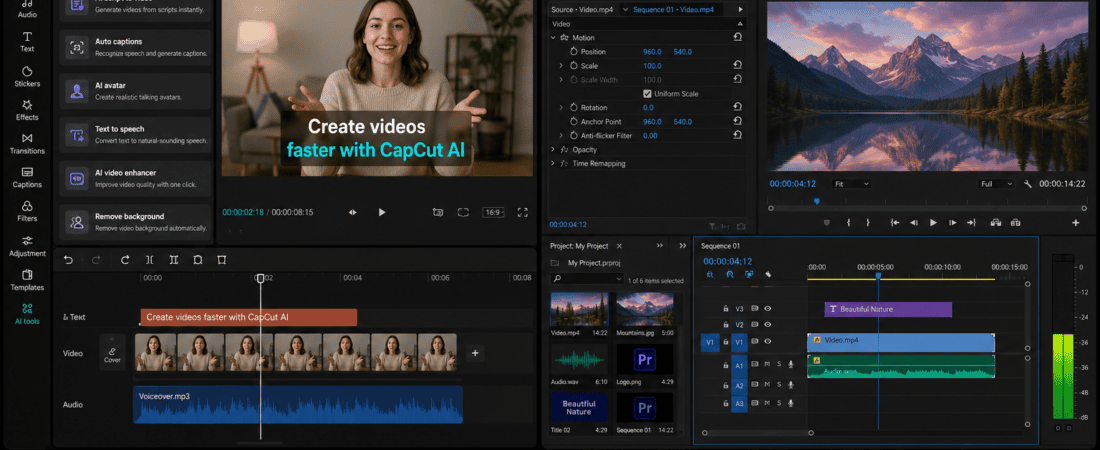
CapCut AI vs Adobe Premiere Pro Choosing a video editor as a beginner can be confusing.
There are hundreds of editing applications available today, but two names come up again and again when people search for an easy yet powerful video editing solution: CapCut and Adobe Premiere Pro.
Both can create professional-looking videos, but they are designed with very different users in mind.
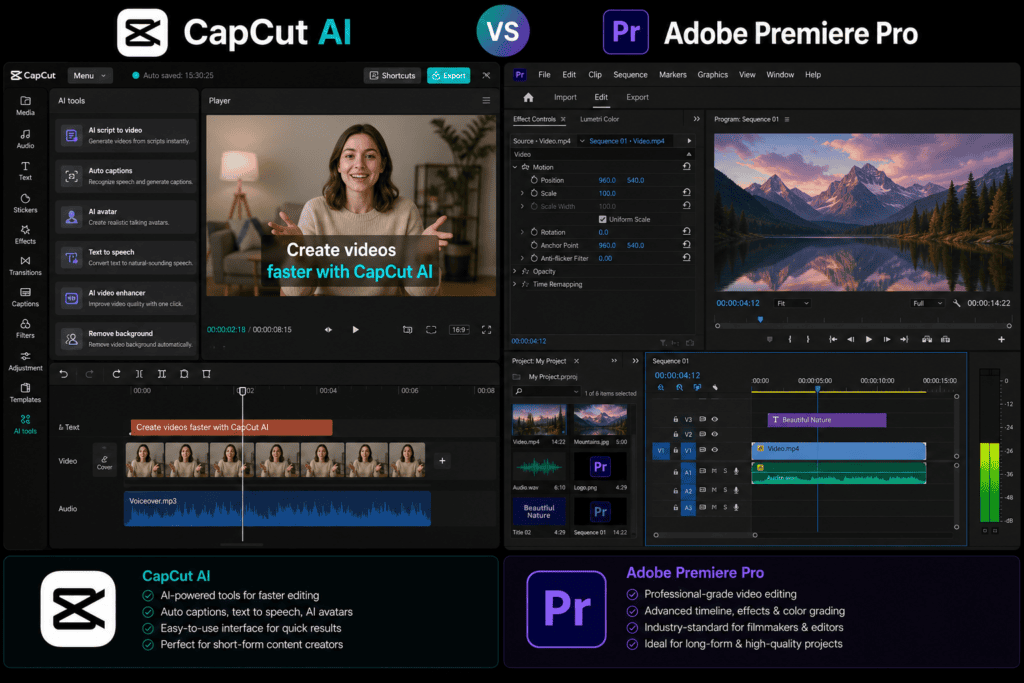
CapCut focuses heavily on simplicity, templates, AI-assisted editing, short-form content, and fast results. Adobe Premiere Pro is a professional video editing application built for much more complex projects, giving editors detailed control over almost every part of the editing process.
That creates an obvious question:
CapCut AI vs Adobe Premiere Pro — which is better for beginners?
If your goal is to create TikTok videos, Instagram Reels, YouTube Shorts, promotional videos, or simple social media content, CapCut can be much easier to learn.
If you want to become a professional video editor, work on long-form YouTube videos, documentaries, commercials, films, or complex client projects, Premiere Pro offers much deeper editing capabilities.
In this guide, we’ll compare CapCut AI and Adobe Premiere Pro based on ease of use, AI features, editing tools, learning curve, social media videos, YouTube, transitions, captions, audio, effects, templates, performance, pricing, professional workflows, and beginner-friendliness.
By the end, you’ll know which video editor makes more sense for your goals.
CapCut AI vs Adobe Premiere Pro: Quick Comparison
| Feature | CapCut | Adobe Premiere Pro |
|---|---|---|
| Beginner friendliness | Excellent | Moderate |
| Learning curve | Very low | High |
| AI tools | Strong | Strong |
| Templates | Excellent | Limited compared with CapCut |
| Short-form videos | Excellent | Excellent |
| YouTube videos | Excellent | Excellent |
| Professional editing | Good | Excellent |
| Advanced color grading | Moderate | Excellent |
| Audio editing | Good | Excellent |
| Motion graphics integration | Good | Excellent |
| Social media content | Excellent | Excellent |
| Long-form editing | Good | Excellent |
| Advanced workflows | Limited | Excellent |
| Best for beginners | CapCut | — |
| Best for professionals | — | Premiere Pro |
This comparison immediately tells us something important.
CapCut is easier. Premiere Pro is deeper.
But let’s look at the differences in detail.
What Is CapCut AI?
CapCut is a video editing platform developed by ByteDance.
It became particularly popular because it made short-form video editing accessible to beginners.
Instead of requiring users to understand complicated editing terminology, CapCut provides a relatively simple workflow.
Depending on the version and current availability, its AI-assisted features can help with tasks such as:
- Automatic captions
- Background removal
- Text-to-speech
- AI effects
- Script assistance
- Auto editing
- Video enhancement
- Background generation
- Smart editing features
- Social media templates
The biggest attraction is speed.
If I need to turn a few clips into a short social media video, I don’t necessarily need to build everything from scratch.
I can start with a template or basic timeline and gradually customize it.
What Is Adobe Premiere Pro?
Adobe Premiere Pro is a professional non-linear video editing application from Adobe.
It is widely used for professional video production and provides extensive control over:
- Video tracks
- Audio tracks
- Color
- Effects
- Transitions
- Keyframes
- Captions
- Multicam editing
- Professional media workflows
- Export settings
- Timeline editing
Premiere Pro is not primarily designed around “one-click video creation.”
Instead, it gives the editor control.
That is its biggest strength.
It is also the reason beginners can initially find it intimidating.
CapCut AI vs Premiere Pro: Which Is Easier?
Let’s start with the most important question for beginners.
Which one can I learn faster?
For most beginners, the answer is CapCut.
When I approach a simple social media project in CapCut, the workflow can be as straightforward as:
Import clips → Arrange clips → Add text → Add music → Add captions → Export
There are plenty of shortcuts and templates that reduce the amount of manual work.
Premiere Pro is different.
A beginner needs to understand concepts such as:
- Sequences
- Tracks
- Timeline
- Keyframes
- Codecs
- Frame rates
- Audio mixing
- Effects
- Media organization
These concepts aren’t necessarily difficult forever, but they require learning.
Winner: CapCut
CapCut AI vs Premiere Pro for Social Media Videos
This is where CapCut becomes especially powerful.
Social media videos usually need to be:
- Fast
- Engaging
- Vertical
- Caption-heavy
- Visually dynamic
- Easy to produce
CapCut is designed around this type of content.
If I were creating a Reel, I could quickly:
- Import the clips.
- Change the canvas to vertical.
- Trim unnecessary sections.
- Add captions.
- Add music.
- Apply effects.
- Add text.
- Export.
The process doesn’t require a deep understanding of professional post-production.
Premiere Pro can absolutely create the same video.
However, I’d probably spend more time setting up the project and manually controlling details.
Winner: CapCut
CapCut AI vs Premiere Pro for YouTube Videos
Now the comparison becomes more balanced.
For a simple YouTube video, CapCut can be perfectly adequate.
For example:
Talking-head video
You could:
- Cut pauses
- Add captions
- Add B-roll
- Add music
- Add transitions
- Add a thumbnail-style intro
CapCut handles this type of workflow well.
But if the video becomes more complex, Premiere Pro starts to pull ahead.
Imagine a 30-minute documentary with:
- Multiple cameras
- Several audio tracks
- Dozens of B-roll clips
- Color correction
- Detailed sound design
- Graphics
- Complex transitions
- Multiple sequences
Premiere Pro becomes much more suitable.
Winner for simple YouTube videos: CapCut
Winner for advanced YouTube production: Premiere Pro
Which Has Better AI Features?
This is an interesting comparison because both platforms have invested heavily in AI-assisted workflows.
CapCut AI
CapCut’s AI features are generally focused on making editing faster and easier.
Depending on current availability, these can include:
- Automatic captions
- AI background removal
- Text-to-speech
- AI effects
- Script-to-video workflows
- Smart editing
- AI enhancement
For beginners, this is useful because the software can automate repetitive tasks.
Premiere Pro AI
Adobe has integrated AI into Premiere Pro through Adobe’s Firefly-powered capabilities and other intelligent editing features.
Premiere Pro can assist with tasks such as:
- Generative Extend
- Media analysis
- Text-based editing
- Speech-related workflows
- Captioning
- Search and organization
- Audio enhancement
The difference is that Premiere Pro’s AI features are built into a much more professional editing environment.
Winner for beginner-friendly AI: CapCut
Winner for professional AI-assisted editing: Premiere Pro
CapCut AI vs Premiere Pro for Automatic Captions
Captions have become extremely important for social media.
Many people watch videos without sound.
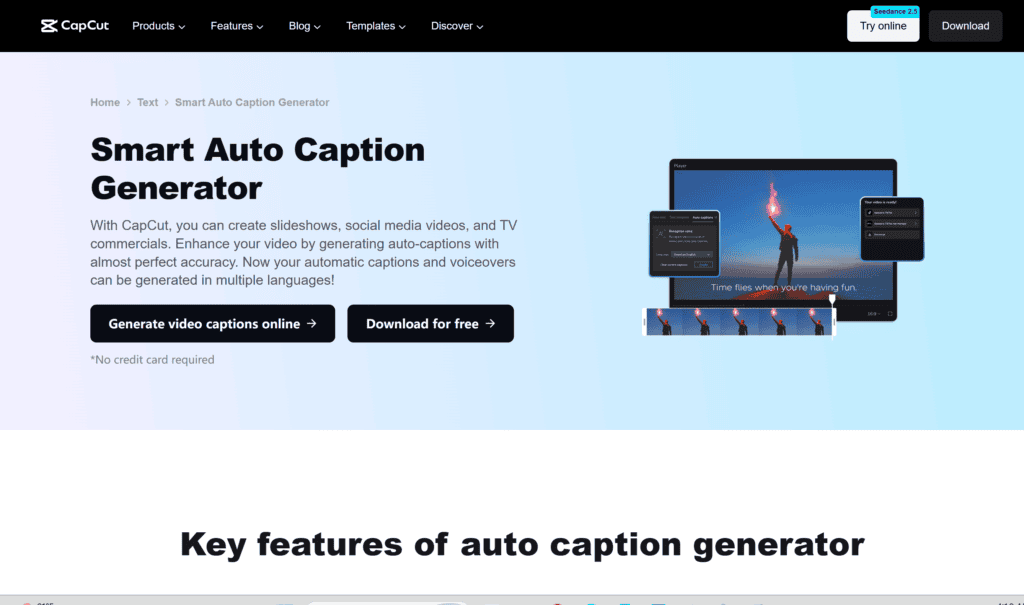
CapCut makes automatic caption generation very accessible.
My workflow would be:
Import video → Generate captions → Correct mistakes → Style captions → Export
The important step is correcting the captions.
AI-generated captions aren’t guaranteed to be perfect.
Premiere Pro also provides strong captioning and speech-related workflows.
If I’m producing professional long-form content, I might prefer Premiere Pro because captions can be integrated into a broader professional editing workflow.
Winner for simplicity: CapCut
Winner for professional workflows: Premiere Pro
Which Is Better for Beginners Learning Video Editing?
This depends on your long-term goal.
If your goal is:
“I want to make good videos quickly.”
Choose CapCut.
If your goal is:
“I want to become a professional video editor.”
Premiere Pro may be worth learning from the beginning.
There’s an important distinction here.
CapCut can teach you basic editing concepts such as:
- Cutting
- Trimming
- Timing
- Transitions
- Audio
- Text
- Captions
- Storytelling
Those skills transfer to other editing software.
But Premiere Pro teaches you professional editing workflows from the beginning.
Winner for immediate results: CapCut
Winner for professional career preparation: Premiere Pro
CapCut AI vs Premiere Pro for Templates
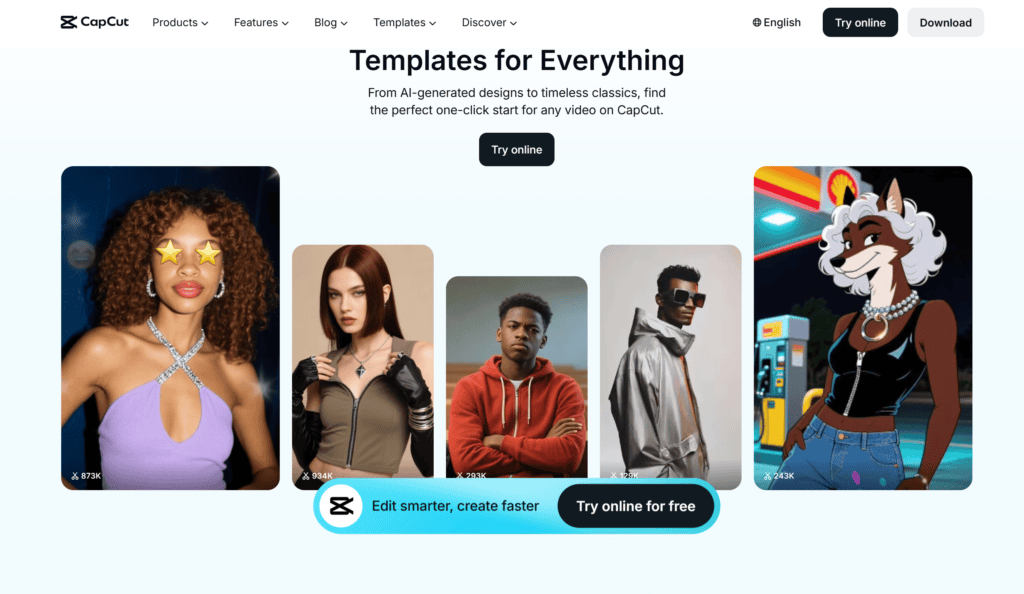
Templates are one of CapCut’s strongest advantages.
If I don’t want to create every effect manually, I can start with an existing template and replace:
- Videos
- Images
- Text
- Music
- Branding
This is especially useful for TikTok and Reels.
Premiere Pro is much more manual.
You can use templates and motion graphics assets, but the overall experience is less centered around one-click social media templates.
Winner: CapCut
Which Is Better for Reels and TikTok?
If your primary content format is:
TikTok + Instagram Reels + YouTube Shorts
I’d strongly lean toward CapCut.
The platform is designed around fast, visually engaging short-form content.
For example, a basic Reel workflow could be:
Hook → Clip → Caption → B-roll → Sound effect → CTA
CapCut makes this type of editing relatively quick.
Premiere Pro can create much more sophisticated versions of the same video, but the additional control isn’t always necessary.
Winner: CapCut
CapCut vs Premiere Pro for Long-Form Videos
For long-form content, Premiere Pro has a major advantage.
Imagine editing:
45-minute interview
with:
- Two cameras
- Three microphones
- B-roll
- Multiple speakers
- Music
- Graphics
- Color correction
Premiere Pro provides the kind of timeline and media-management capabilities needed for complex projects.
CapCut can handle long videos, but it isn’t the tool I’d choose first for a professional multi-layer production.
Winner: Premiere Pro
Which Has Better Color Grading?
This is another major difference.
CapCut provides basic color adjustments and creative effects.
For social media content, that’s often enough.
Premiere Pro provides much more detailed control over color correction and grading, particularly when used alongside Adobe’s professional color workflows.
If I need to make footage from different cameras look consistent, I’d prefer Premiere Pro.
Winner: Premiere Pro
Which Has Better Audio Editing?
Audio can make or break a video.
CapCut provides useful basic tools for:
- Volume adjustment
- Music
- Sound effects
- Voiceovers
- Noise-related improvements
For social media content, this can be sufficient.
Premiere Pro provides more sophisticated audio workflows.
You can work with:
- Multiple tracks
- Keyframes
- Audio effects
- Mixing
- Dialogue
- Background music
- Sound design
Winner: Premiere Pro
CapCut AI vs Premiere Pro for Motion Graphics
If you want animated text and simple effects, CapCut can do a lot.
You can create:
- Animated titles
- Text effects
- Stickers
- Social media animations
- Simple transitions
For advanced motion graphics, however, Adobe’s ecosystem becomes more powerful.
Premiere Pro also works closely with After Effects, which is one of Adobe’s strongest tools for professional motion graphics.
Winner: Premiere Pro
Which Is Better for Freelancers?
This depends on your clients.
If you’re a freelancer making:
- Reels
- TikToks
- Short ads
- Social media content
- Basic YouTube videos
CapCut can be incredibly efficient.
If your clients need:
- Commercials
- Corporate videos
- Documentaries
- Long-form YouTube productions
- Professional editing
- Complex post-production
Premiere Pro is more suitable.
A freelance editor who knows both can serve a wider range of clients.
CapCut AI vs Premiere Pro for Small Businesses
Small businesses usually care about speed and cost.
A restaurant may need:
- Food Reels
- Promotional videos
- Offer videos
- Customer testimonials
A clothing store might need:
- Product videos
- Sale announcements
- Outfit Reels
A real estate agent might need:
- Property tours
- Short promotional videos
- Listing videos
For these types of projects, CapCut can be extremely practical.
You don’t need a complicated post-production workflow for every social media video.
Winner: CapCut
Which Is Better for Professional Video Editors?
Premiere Pro.
There isn’t much debate here.
Professional editors need precise control over the timeline, media, audio, color, effects, and export workflow.
Premiere Pro is designed around those requirements.
CapCut is excellent for fast content creation, but professional post-production often requires greater control.
Winner: Premiere Pro
CapCut AI vs Premiere Pro for Video Ads
This one depends on the type of advertisement.
For a simple 15-second social media advertisement:
CapCut
can be extremely efficient.
For a polished commercial with:
- Multiple scenes
- Professional sound
- Color grading
- Motion graphics
- Complex visual effects
Premiere Pro
is the better choice.
How I Would Create a Reel in CapCut
If I’m creating a Reel for a business, I’d keep the workflow simple.
Step 1: Select the hook
The first few seconds need to communicate why someone should continue watching.
Step 2: Import footage
Bring in the best clips.
Step 3: Remove dead space
Cut pauses and unnecessary sections.
Step 4: Add captions
Generate automatic captions and manually correct errors.
Step 5: Add visual movement
Use zooms, cuts, B-roll, or simple animations.
Step 6: Add branding
Include logo, colors, or consistent typography.
Step 7: Add music
Keep the music low enough that dialogue remains clear.
Step 8: Export
Check the final video before publishing.
The biggest advantage is speed.
How I Would Create a YouTube Video in Premiere Pro
For a longer project, I’d approach it more systematically.
Step 1: Organize footage
Create bins for:
- A-roll
- B-roll
- Music
- Sound effects
- Graphics
- Images
Step 2: Create a sequence
Set the appropriate resolution and frame rate.
Step 3: Build the rough cut
Remove mistakes and unnecessary sections.
Step 4: Refine pacing
Make the story flow naturally.
Step 5: Add B-roll
Use supporting footage to keep the video visually interesting.
Step 6: Edit audio
Balance dialogue, music, and sound effects.
Step 7: Color correct
Make the footage consistent.
Step 8: Add graphics
Add titles and visual information.
Step 9: Review
Watch the entire video before exporting.
Step 10: Export
Use the appropriate settings for the target platform.
This workflow takes longer, but it gives much more control.
Is CapCut Good Enough for Professional Work?
Sometimes.
“Professional” doesn’t automatically mean “Premiere Pro.”
If a client needs a TikTok video and CapCut lets you produce exactly what they need efficiently, there’s nothing inherently wrong with using CapCut.
The final product matters.
However, if the project requires complex editing, professional media management, detailed color work, advanced audio, or extensive post-production, Premiere Pro becomes a much stronger option.
Is Premiere Pro Too Difficult for Beginners?
Not necessarily.
It has a steeper learning curve, but that doesn’t mean a beginner shouldn’t learn it.
The mistake is trying to learn everything at once.
If I were learning Premiere Pro from scratch, I’d focus first on:
- Importing media
- Creating sequences
- Cutting clips
- Adding audio
- Adding text
- Using transitions
- Basic color correction
- Exporting
After mastering those fundamentals, I’d move to:
- Keyframes
- Advanced audio
- Color grading
- Multicam editing
- Motion graphics
- Professional workflows
This makes the learning process much less overwhelming.
CapCut AI vs Premiere Pro Pricing
Pricing is another important factor.
CapCut offers free functionality, although specific features, assets, AI capabilities, and limits can vary by region, platform, and plan.
Premiere Pro is a subscription-based professional application.
Adobe’s current pricing should be checked directly before purchasing because plans and regional prices can change.
For a beginner who simply wants to make occasional social videos, paying for professional software may not make financial sense.
For someone building a professional editing career, the investment may be worthwhile.
Free vs Paid: Don’t Choose Only by Price
A common mistake is thinking:
Free = better
That’s not necessarily true.
Ask:
What am I trying to create?
If I need five short social videos every week, a free or inexpensive editor may be perfect.
If I’m building a professional editing portfolio, learning a professional application can be a better long-term investment.
The software should match the job.
Common Beginner Mistakes in CapCut
Using too many effects
Just because an effect exists doesn’t mean you need it.
Overusing transitions
Simple cuts often look better.
Adding unreadable captions
Keep text clear and appropriately sized.
Using too many fonts
Two fonts are usually enough.
Making music too loud
Dialogue should remain understandable.
Copying viral templates blindly
A trend isn’t automatically right for your brand.
Common Beginner Mistakes in Premiere Pro
Trying to learn everything at once
Start with basic editing.
Ignoring media organization
A messy project becomes difficult to manage.
Using too many effects
Effects shouldn’t replace storytelling.
Forgetting audio
Good visuals cannot rescue terrible sound.
Exporting without checking
Always watch the final export.
Can CapCut Replace Premiere Pro?
For some users, yes.
For everyone, no.
If you’re producing:
- TikToks
- Reels
- Shorts
- Simple promotional videos
CapCut may be enough.
If you’re producing:
- Documentaries
- Commercials
- Complex YouTube productions
- Professional client projects
- Multi-camera productions
Premiere Pro is a much better fit.
Can Premiere Pro Replace CapCut?
Technically, Premiere Pro can perform most of the editing tasks you might do in CapCut.
But that’s not the same as saying it’s the better choice.
If I’m trying to produce a simple Reel quickly, I don’t necessarily want to spend extra time setting up a professional editing workflow.
Sometimes simpler is better.
Which Video Editor Should Beginners Learn First?
Here’s my recommendation.
Choose CapCut if you want:
- Fast results
- TikTok videos
- Instagram Reels
- YouTube Shorts
- Templates
- AI-assisted editing
- Simple YouTube videos
- Easy captions
- Beginner-friendly editing
Choose Premiere Pro if you want:
- Professional editing skills
- Long-form video
- Advanced YouTube production
- Commercials
- Documentaries
- Professional client work
- Advanced audio
- Detailed color workflows
- Complex editing
My Verdict: CapCut AI vs Adobe Premiere Pro
So, which one is better?
For beginners who want to create social media videos quickly, CapCut is the clear winner.
It’s easier to learn, faster to use, and built around the type of short-form content that dominates platforms such as TikTok, Instagram, and YouTube Shorts.
For someone who wants to build a professional video editing career, Premiere Pro is the stronger long-term choice.
It has a much steeper learning curve, but that complexity gives editors greater control.
I would summarize the comparison like this:
CapCut = speed + simplicity + AI + social media
Premiere Pro = control + professional workflows + advanced editing
If you’re completely new to video editing, start with CapCut and learn the fundamentals.
If you already know basic editing and want to move toward professional work, start learning Premiere Pro.
And if you’re serious about becoming a versatile video editor?
Learn both.
Use CapCut when a client needs a fast social media Reel.
Use Premiere Pro when a project requires deeper control.
The goal isn’t to become loyal to one editing application.
The goal is to choose the right tool for the project.
Frequently Asked Questions
Is CapCut better than Premiere Pro for beginners?
For most beginners, yes. CapCut has a simpler interface, templates, AI-assisted features, and a workflow designed around quick content creation.
Is Premiere Pro harder to learn than CapCut?
Yes. Premiere Pro provides significantly more professional control, which also creates a steeper learning curve.
Can I make professional videos in CapCut?
Yes. CapCut can produce high-quality social media videos and other projects. Whether it is appropriate depends on the complexity and requirements of the project.
Is CapCut free?
CapCut provides free editing features, but some features and assets may be restricted depending on the current plan, region, and platform.
Is Adobe Premiere Pro free?
Premiere Pro is generally offered as a paid Adobe subscription rather than a permanently free application. Adobe sometimes provides trial access, so check the current official offer before subscribing.
Which is better for TikTok?
CapCut is generally the more convenient choice for TikTok-style short-form editing.
Which is better for YouTube?
For simple YouTube videos, either can work. For complex, long-form, multi-track, or professional YouTube productions, Premiere Pro is the stronger choice.
Which is better for Reels?
CapCut is an excellent choice for Instagram Reels because of its quick editing workflow, templates, captions, effects, and social-focused features.
Which is better for professional video editing?
Premiere Pro is the stronger choice for professional editing workflows that require detailed control over video, audio, color, effects, and media management.
Should I learn CapCut before Premiere Pro?
You don’t have to. If your long-term goal is professional editing, you can start directly with Premiere Pro. However, CapCut can be an easier way to learn basic editing concepts.
Can AI completely edit a video for me?
AI can automate many editing tasks, but human review is still important. You should check pacing, captions, audio, visual quality, factual information, branding, and storytelling before publishing.
Which one is best for a social media manager?
For a social media manager producing frequent short-form content, CapCut is usually the more practical choice. Premiere Pro becomes more valuable when the content requires advanced editing.
Check out here if you want to know about Leonardo AI vs Midjourney: Best Free AI Image Generator Comparison