
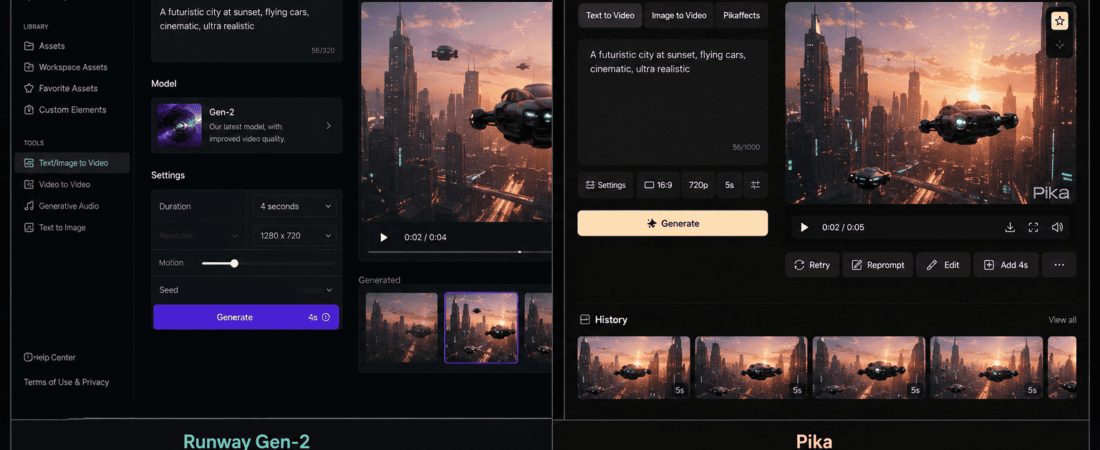
Runway Gen 2 vs Pika Labs: AI video generation has changed dramatically in a short amount of time.
A few years ago, creating a realistic video from a simple text prompt sounded like something from a science-fiction movie. Today, creators can describe a scene, upload an image, animate a character, create visual effects, or turn a concept into a short video without owning an expensive camera or having advanced animation skills.
Two names that became especially popular during the early growth of AI video were Runway Gen-2 and Pika Labs.
Gen-2 helped establish Runway as one of the major names in generative video, while Pika became popular among creators because of its accessible interface and fun image-to-video and text-to-video effects.
But there’s an important problem with comparing them as though their 2023 or 2024 versions are still the current products.
Runway’s current platform has moved far beyond Gen-2. Its current free plan focuses on newer models such as Gen-4 Turbo for image-to-video, while Gen-2 is no longer the centerpiece of the current free offering. Runway currently provides 125 one-time free credits, and its present platform includes several newer video and creative tools.
Pika has also evolved. Its current free plan provides monthly video credits and access to Pika 2.5 at 480p, along with several creative features such as Pikascenes, Pikadditions, Pikaswaps, Pikatwists and Pikaffects, depending on the generation type.
So if you’re searching for:
Runway Gen 2 vs Pika Labs: Which free AI video tool should I use?
the most useful answer today is slightly different:
Runway is the stronger choice for cinematic and professional creative workflows, while Pika is particularly attractive for experimenting with effects, transformations, social-media clips, and quick AI video ideas.
And if your priority is strictly free recurring usage, Pika currently has an interesting advantage because its free plan provides monthly credits, whereas Runway’s current free plan gives a one-time credit allocation.
Let’s break everything down.
Runway Gen 2 vs Pika Labs: Quick Comparison
| Feature | Runway | Pika |
|---|---|---|
| Current free plan | Yes | Yes |
| Free credits | 125 one-time credits | Monthly video credits |
| Current video model focus | Gen-4 Turbo and newer models | Pika 2.5 |
| Gen-2 availability | No longer the main current free model | N/A |
| Text-to-video | Yes, depending on model | Yes |
| Image-to-video | Yes | Yes |
| AI effects | Yes | Excellent |
| Image animation | Excellent | Excellent |
| Social-media experiments | Excellent | Excellent |
| Cinematic generation | Excellent | Very good |
| Creative transformations | Excellent | Excellent |
| Beginner friendly | Very good | Excellent |
| Free recurring credits | No | Yes |
| Watermark on free downloads | Current free plan has limitations; check export | No watermark on current free plan |
| Commercial use | Runway says outputs are yours on every plan | Current free plan lists commercial use |
| Best for | Professional creative workflows | Fun effects and frequent experimentation |
Current plan details are subject to change, so check the official pricing pages before starting a larger project.
What Was Runway Gen-2?
Runway Gen-2 was one of the models that helped popularize generative AI video.
It allowed users to generate short video clips from prompts and images.
At the time, this was a major step forward.
Instead of learning traditional 3D animation or filming a physical scene, a creator could type something like:
A cinematic shot of a woman walking through a futuristic city at night, neon lights reflecting on wet streets.
The model would attempt to turn that description into moving imagery.
The technology wasn’t perfect.
Faces could change.
Hands could look strange.
Objects sometimes moved unpredictably.
Camera motion could become inconsistent.
But Gen-2 demonstrated how quickly AI video was developing.
Today, however, it would be misleading to describe Gen-2 as Runway’s current flagship free video experience.
Runway’s current product lineup has moved to newer generations and other models. Its current free plan lists Gen-4 Turbo image-to-video rather than Gen-2.
That’s important if you’re writing an up-to-date comparison.
What Is Pika?
Pika is an AI video creation platform built around generating and transforming short videos.
One of the things that made Pika attractive to casual creators was its emphasis on experimentation.
Instead of treating AI video generation as something reserved for filmmakers, Pika made it relatively easy to try visual ideas.
You can use it for things such as:
- Image-to-video
- Text-to-video
- Creative effects
- Object additions
- Object swaps
- Scene transformations
- Character effects
- Short social-media clips
Its current free plan provides monthly video credits and includes access to Pika 2.5 at 480p. It also lists features such as Pikascenes, Pikadditions, Pikaswaps, Pikatwists and Pikaffects.
My Practical Experience With Runway
What I like most about Runway is that it feels more like a complete creative environment than a single AI generator.
When I’m working on an AI video concept, I don’t always want to generate one random clip and stop.
I might need to:
- Create an image.
- Animate it.
- Try another visual direction.
- Edit the footage.
- Generate additional shots.
- Stitch clips together.
- Prepare the final sequence.
Runway is well suited to that kind of workflow.
Its current platform includes multiple AI video models rather than forcing creators to use only one generation system. Runway says users can access models including its own Gen-4.5 and other models such as Kling, Veo and Seedance, depending on plan and availability.
That makes it much more useful for creators who are thinking beyond a single AI clip.
The downside is the free plan.
Runway currently gives free users 125 credits as a one-time allocation, rather than refreshing those credits every month.
So I treat the free Runway account more like a testing budget.
I don’t waste credits generating dozens of random versions.
I first improve the prompt, decide what visual style I want, and then generate.
My Practical Experience With Pika
Pika feels more experimental.
When I want to take an image and ask:
What interesting thing could happen to this?
Pika is often the first kind of tool I think about.
For example, I could start with a product image and experiment with:
- A dramatic movement
- A surreal transformation
- A creative camera effect
- An object appearing
- An object disappearing
- A stylized scene
The interface and feature set encourage experimentation.
That’s especially useful for social-media creators who don’t necessarily need a long cinematic sequence.
The current free plan is also interesting because it provides monthly video credits. Pika’s current pricing page lists 80 monthly video credits on the Basic free plan, while its FAQ currently describes 150 credits for the Basic plan, indicating that the displayed plan information may be in transition. Because of this discrepancy, check the live pricing page at the time you sign up rather than relying on an old article.
That’s an important detail for anyone comparing free AI video tools.
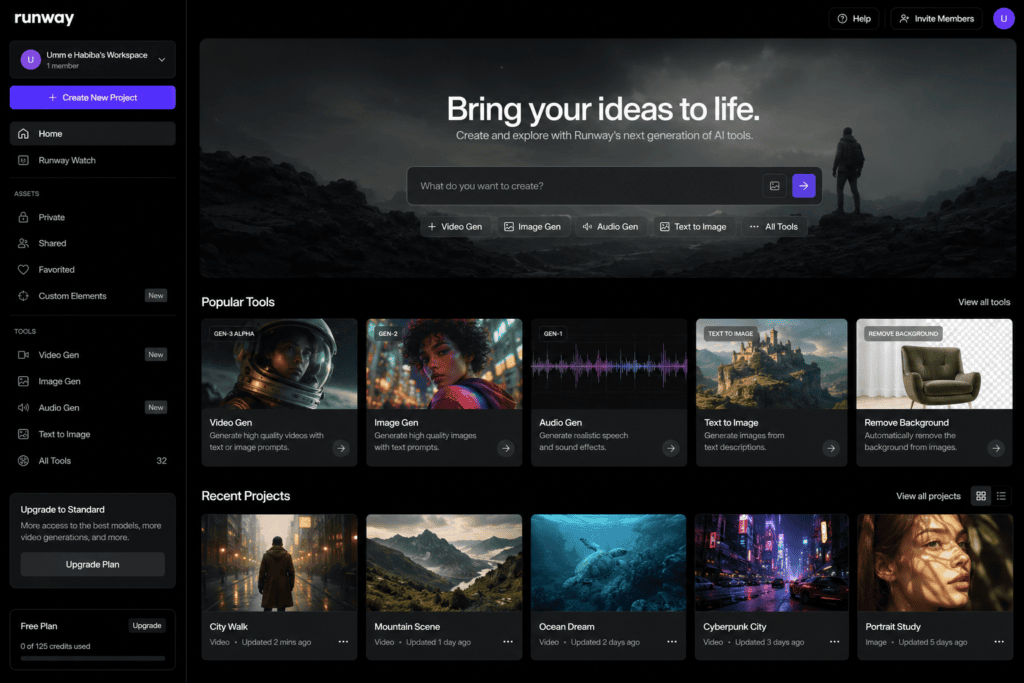
Runway vs Pika: Which Has the Better Free Plan?
This is one of the most interesting parts of the comparison.
Runway gives:
125 one-time credits.
Pika provides:
recurring monthly free video credits.
That means Pika can be more useful if you’re someone who wants to experiment regularly without paying.
Imagine you’re creating social media content every month.
With Runway’s current free allocation, once you’ve used the credits, you don’t simply receive another free monthly batch.
Pika’s free structure is more suitable for ongoing experimentation.
Winner for recurring free usage: Pika
However, there’s another side.
Runway’s free plan gives you access to a more extensive creative platform and newer-generation models.
Winner for overall creative platform: Runway
Runway vs Pika for Text-to-Video
Text-to-video means describing the scene instead of uploading an existing image.
For example:
A golden retriever running across a beach at sunset, cinematic camera movement, realistic lighting, shallow depth of field.
Both platforms can work with text-based generation.
The real difference is what you’re trying to create.
If I’m experimenting with a simple social-media concept, Pika is appealing.
If I’m trying to build a cinematic sequence with a broader production workflow, Runway is more attractive.
Winner for professional workflow: Runway
Winner for quick experimentation: Pika
Runway vs Pika for Image-to-Video
Image-to-video is often more predictable than starting entirely from text because you already have a visual reference.
For example, suppose you’ve generated a product image.
You can upload it and ask the AI to animate:
Slow cinematic camera push toward the product, subtle movement in the background, realistic studio lighting.
Both tools can be useful here.
Runway’s current free plan specifically includes Gen-4 Turbo for image-to-video.
Pika also offers image-to-video functionality through its current generation tools.
Winner: Tie
Which Is Better for Social Media Videos?
This is where Pika becomes particularly interesting.
Social media creators often don’t need a two-minute cinematic film.
They need:
- A 5-second hook
- A product animation
- A funny transformation
- A visual effect
- A short Reel
- A TikTok clip
- A creative transition
Pika’s feature set is heavily suited to these kinds of experiments.
Its current platform includes features such as Pikaffects, Pikaswaps, Pikadditions and Pikatwists.
Runway can absolutely create social-media footage too, but it feels more appropriate when the clip is part of a broader production workflow.
Winner for quick social experiments: Pika
Which Is Better for Cinematic AI Video?
Runway.
This is one of the areas where Runway’s broader creative ecosystem becomes valuable.
Current Runway offers multiple high-end video models and positions its platform for applications such as short scenes, music videos, advertising, b-roll, animation, character performances, product reshoots and more.
If I were developing a cinematic concept, I would rather have a platform where I can experiment with different models and then continue working on the footage.
Winner: Runway
Runway vs Pika for AI Video Effects
Pika has a strong advantage here.
Its tools are designed around creative manipulation.
For example, you might start with an ordinary image and transform it into something visually unexpected.
This is perfect for:
- Meme content
- Instagram Reels
- TikTok videos
- Creative advertisements
- Before-and-after effects
- Experimental videos
Winner: Pika
Which Is Easier for Beginners?
Both are relatively approachable.
But I would give Pika a slight advantage for someone who simply wants to experiment.
The workflow is straightforward:
Upload → choose effect → generate → download
Runway has more features, which is excellent for serious creators but can make the platform feel larger.
If you’re a beginner who has never used AI video before, Pika can be a comfortable starting point.
Winner: Pika
Which Has Better Creative Control?
Runway.
As your project becomes more complicated, you usually need more control.
You might want:
- Consistent characters
- Multiple shots
- Controlled references
- Editing
- Different models
- Precise scene changes
- More advanced workflows
Runway’s current platform is increasingly built around this broader production process.
Its current AI video editor, for example, includes workflows for editing existing footage, changing backgrounds, adjusting lighting and restyling clips. The advanced Edit Studio and Aleph 2.0 capabilities are currently on paid plans, but they demonstrate how much broader the platform has become beyond Gen-2.
Winner: Runway
Runway vs Pika for Product Videos
AI video can be useful for product marketing.
Imagine you have a simple product photo but don’t have a studio video.
You could potentially turn the still image into a short moving clip.
For example:
Slow camera movement around a luxury perfume bottle on a reflective black surface, soft studio lighting, premium commercial aesthetic.
Pika is useful for quick experiments.
Runway is better if you’re building a larger campaign with multiple shots.
Runway currently positions its platform for product reshoots, advertising, b-roll and marketing content.
Winner for larger campaigns: Runway
Winner for quick experiments: Pika
Runway vs Pika for AI Animation
Both tools can animate still images.
This is especially useful if you’re creating:
- Character artwork
- Illustrations
- Concept art
- Storyboards
- Digital paintings
The trick is to avoid asking for too much movement.
A prompt such as:
Character walking through a forest, camera slowly following behind, leaves moving gently in the wind
is usually more manageable than:
Character runs, jumps, spins, fights three enemies, transforms into a dragon and flies into the sky.
AI video models still have limitations.
Simple motion is often easier to control.
Which Produces More Realistic Results?
This depends heavily on:
- Model
- Prompt
- Reference image
- Subject
- Motion
- Generation settings
It would be inaccurate to say one platform always produces more realistic video.
Runway’s newer models are considerably more relevant to this question than the old Gen-2 model.
Likewise, Pika’s current 2.5 generation should be compared against current Runway models rather than against older Runway releases.
That is why an article comparing only “Gen-2 vs Pika” can become outdated quickly.
The Problem With Old Runway Gen-2 Comparisons
If you’ve searched Google for:
you’ll probably find articles discussing old free credits, old interfaces and older video quality.
Some of those articles may still rank well.
But AI video platforms change extremely quickly.
Runway’s current free plan no longer centers on Gen-2. Its current pricing page lists Gen-4 Turbo image-to-video as the free-plan generative video option.
So if you’re choosing a tool today, don’t choose Runway simply because an old article says:
“Gen-2 is the best free Runway model.”
That may no longer reflect the current product.
How to Get Better Results From Runway
My biggest recommendation is to stop writing prompts like novels.
AI video prompts work better when the visual direction is clear.
Instead of:
Make a really beautiful video of a woman in a city and make it look cinematic and professional and realistic with lots of lights and a nice camera movement.
Try:
Cinematic night street scene. Young woman walking through a neon-lit downtown street after rain. Wet pavement reflecting signs. Slow forward camera movement. Natural walking motion. Shallow depth of field. Realistic lighting.
The second prompt gives the model clearer visual information.
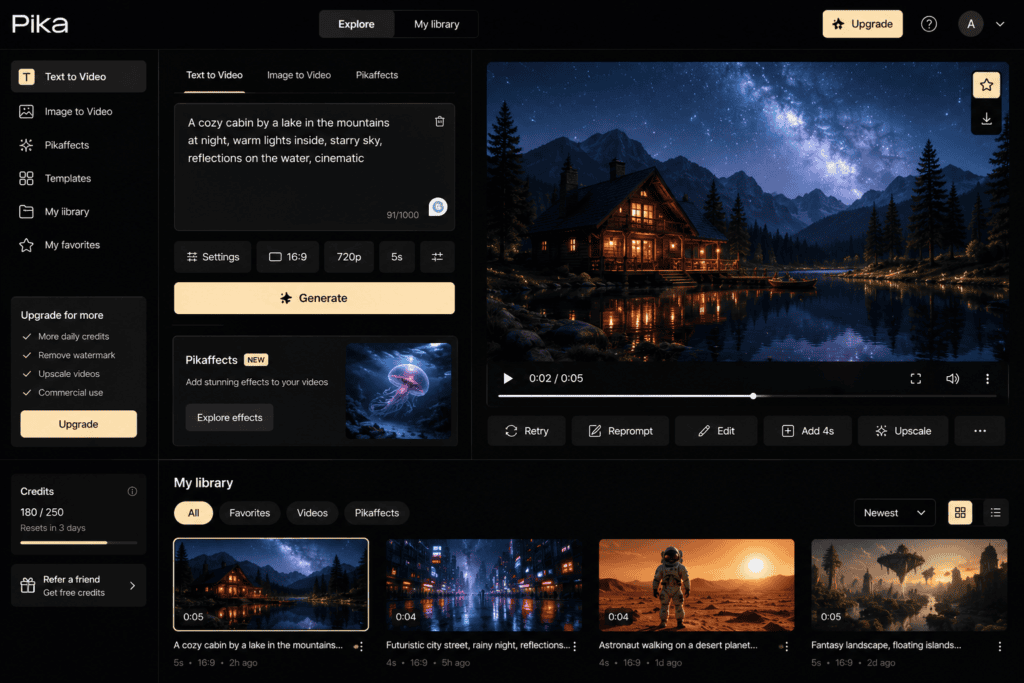
How to Get Better Results From Pika
Pika also benefits from specific prompts.
Think about four things:
Subject
What is moving?
Action
What is happening?
Camera
How should the camera move?
Environment
What should the surroundings do?
For example:
Close-up of a coffee cup on a wooden table. Steam gently rises from the coffee. Camera slowly pushes toward the cup. Warm morning sunlight enters through the window.
That’s much more useful than:
Make this coffee picture move.
Don’t Generate Everything From Scratch
One of the best AI video workflows I’ve discovered is:
Generate image → refine image → animate image
rather than:
Text prompt → hope everything comes out correctly
Why?
Because you can control the composition before adding motion.
For example, if you’re creating an advertisement for a clothing brand, first create a strong product image.
Then animate it.
This gives you more control over:
- Product placement
- Background
- Colors
- Composition
- Model appearance
- Lighting
Both Runway and Pika support image-based video workflows, making this approach practical.
Runway Free Plan: What You Actually Get
Runway currently offers a free plan at $0.
Its current free plan includes:
- 125 one-time credits
- Generative video access through Gen-4 Turbo image-to-video
- Generative image tools
- Text-to-speech
- Audio tools
- Three video editor projects
- 5 GB asset storage
The 125 credits are a one-time allocation, not a monthly refill.
This makes the free plan excellent for testing Runway.
But it isn’t ideal if you want to generate dozens of clips every month without paying.
Pika Free Plan: What You Actually Get
Pika’s current free plan is more interesting for recurring experimentation.
Its pricing page lists:
- $0 monthly cost
- Monthly video credits
- Pika 2.5 at 480p
- Pikascenes
- Pikadditions
- Pikaswaps
- Pikatwists
- Pikaffects
- No-watermark downloads
- Commercial use
The exact credit amount displayed can change; the current pricing page lists 80 monthly video credits, while Pika’s FAQ currently says 150 monthly credits for Basic.
Because the official pages currently show different figures, I’d verify the amount shown in your account before planning a project around a specific number.
Which Free Plan Is Better?
If we judge only by how long the free access lasts, Pika has the advantage because its free credits refresh monthly.
If we judge by access to a broader professional AI video ecosystem, Runway is more attractive.
So:
Recurring free experimentation → Pika
Professional creative platform → Runway
Are Free AI Video Outputs Commercially Usable?
This is something creators should always check.
Runway currently states that users own what they create on every plan, including the Free plan, and says the outputs can be used commercially.
Pika’s current free pricing page also lists commercial use for its Basic plan.
However, commercial use of AI-generated material can involve more than the platform’s license.
You still need to consider:
- Copyright
- Trademarks
- Uploaded images
- Celebrity likenesses
- Music rights
- Client requirements
- Platform policies
Don’t upload copyrighted material simply because an AI tool lets you upload it.
Runway vs Pika for Freelancers
If you’re a freelancer creating content for clients, I would lean toward Runway.
Why?
Client projects often require more than one AI-generated clip.
You may need:
- Product shots
- B-roll
- Different scenes
- Variations
- Image generation
- Video editing
- Multiple AI models
A broader platform is useful.
Pika is still excellent for adding creative effects or producing short social-media assets.
Winner: Runway
Runway vs Pika for TikTok Creators
TikTok creators often value speed and novelty.
A strange transformation that makes people stop scrolling can be more useful than a technically perfect cinematic scene.
Pika’s creative effects make it especially interesting for this type of content.
Winner: Pika
Runway vs Pika for Instagram Reels
Both work well.
For a fashion Reel, for example, Pika could animate a still image into a short effect.
Runway could be used to create more cinematic b-roll.
The choice depends on the creative direction.
Quick creative effect: Pika
Cinematic brand Reel: Runway
Runway vs Pika for YouTube
For YouTube, I’d choose Runway when AI footage is part of a larger production.
A YouTube video might need:
- Establishing shots
- B-roll
- Concept visuals
- Product animations
- Cinematic transitions
Runway’s broader workflow makes it a better fit.
Winner: Runway
Runway vs Pika for Short Films
Runway.
Short films require consistency.
You may need to create multiple shots that belong to the same world.
That requires more than generating one attractive clip.
You need:
- Character consistency
- Location consistency
- Visual style
- Camera continuity
- Shot planning
No AI tool makes this completely effortless, but Runway’s broader ecosystem makes it a stronger choice for serious experimentation.
Winner: Runway
Common Mistakes When Using AI Video Tools
1. Making prompts too vague
“Make it cinematic” isn’t enough.
Describe the scene.
2. Asking for too much movement
Simple motion is easier to control.
3. Ignoring the camera
Camera movement strongly affects the final result.
4. Generating too many versions
Free credits disappear quickly.
Plan before generating.
5. Using low-quality reference images
A poor source image can limit the result.
6. Expecting perfect hands and faces
AI video is improving, but artifacts still happen.
7. Trying to make a whole film from one generation
Generate short shots and assemble them.
8. Forgetting aspect ratio
A TikTok video and a YouTube landscape video have different requirements.
A Better Free AI Video Workflow
Here’s the workflow I’d personally recommend.
Step 1: Write the concept
Know exactly what you’re trying to create.
Step 2: Break it into shots
Don’t ask AI to generate the entire video at once.
Step 3: Create reference images
Get the characters and composition right.
Step 4: Animate the strongest images
Use Runway or Pika.
Step 5: Generate only a few variations
Don’t waste your free credits.
Step 6: Select the strongest clips
Ignore the mediocre generations.
Step 7: Edit everything together
Use a normal video editor if necessary.
Step 8: Add voice and music
Don’t rely entirely on AI-generated visuals.
Step 9: Add captions
Especially for social media.
Step 10: Export for your platform
Use the correct resolution and aspect ratio.
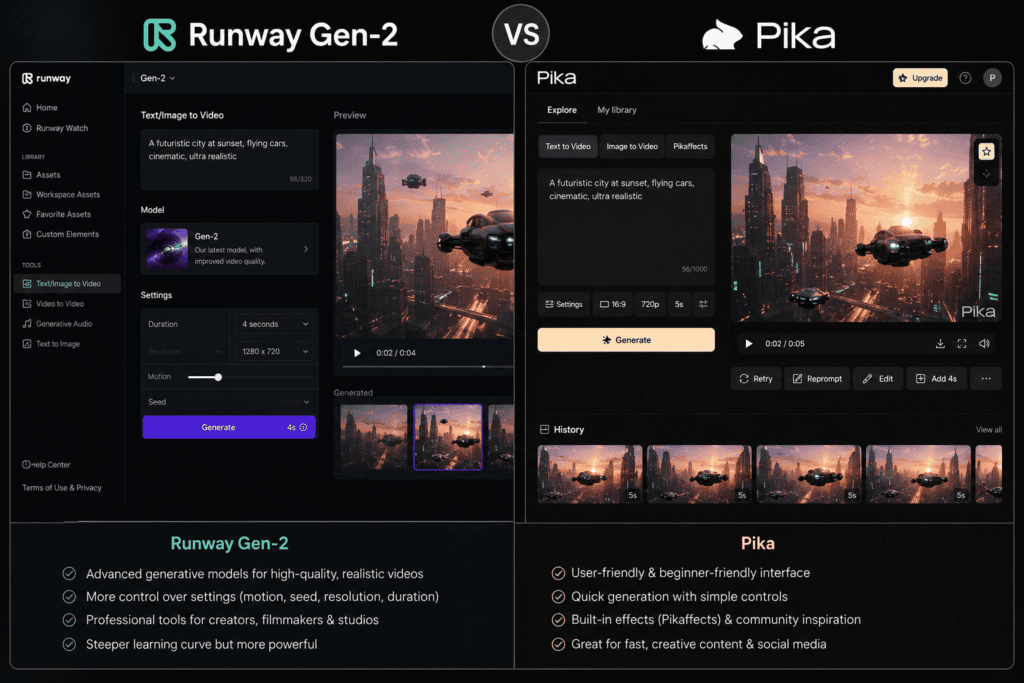
Runway Gen 2 vs Pika Labs: Final Verdict
If we’re talking strictly about the old Runway Gen-2 model, this isn’t really a fair modern comparison anymore.
Runway has moved on.
Its current free plan uses newer technology, including Gen-4 Turbo image-to-video, and the platform now offers a much broader selection of AI video and creative tools.
Pika has also evolved and currently provides Pika 2.5 and a range of creative video effects and transformations.
So the better modern question is:
Runway’s current free AI video tools vs Pika’s current free AI video tools — which should you use?
My answer depends on the creator.
Choose Runway if:
- You want cinematic AI video
- You’re creating YouTube content
- You’re making advertisements
- You’re working on client projects
- You want a broader creative platform
- You want access to multiple AI video models
- You need more professional creative workflows
Choose Pika if:
- You want recurring free credits
- You make TikTok content
- You create Instagram Reels
- You enjoy experimenting
- You want creative effects
- You want quick image transformations
- You make short AI clips
- You’re just starting with AI video
Overall Winners
Best professional AI video platform: Runway
Best recurring free plan: Pika
Best cinematic workflow: Runway
Best creative effects: Pika
Best for YouTube: Runway
Best for TikTok experiments: Pika
Best for product campaigns: Runway
Best for quick transformations: Pika
Best for beginners who want to experiment: Pika
Best for serious AI video creators: Runway
Best free tool for occasional high-quality experiments: Runway
Best free tool for repeated monthly experimentation: Pika
There isn’t one universal winner.
If I had to keep only one tool for a serious video-production workflow, I’d choose Runway.
If I wanted a free tool that I could return to every month to experiment with short-form AI video effects, I’d choose Pika.
And if you’re searching specifically for “Runway Gen-2 vs Pika Labs,” remember that Gen-2 is now more of a historical reference point than the best way to judge Runway’s current capabilities.
The AI video landscape changes too quickly for old model-versus-model comparisons to remain accurate for long.
The smarter approach is to compare the current models, free credits, export options, commercial rights, and actual workflow.
That’s what matters when you’re deciding which tool deserves a place in your content-creation process.
Frequently Asked Questions
Is Runway Gen-2 still free?
Runway currently has a free plan, but Gen-2 is no longer the main video model listed for the free plan. The current free plan includes Gen-4 Turbo for image-to-video.
Is Pika free?
Yes. Pika currently offers a Basic free plan with monthly video credits and access to selected video-generation features.
Is Runway better than Pika?
For professional and cinematic workflows, Runway is generally the stronger choice. Pika can be better for creative effects, quick experiments, and recurring free usage.
Does Pika have monthly free credits?
Yes. Pika’s free Basic plan provides monthly video credits. The exact displayed amount should be checked on the live pricing page because Pika’s current pricing and FAQ pages show different credit figures.
Does Runway’s free plan refresh every month?
No. Runway currently describes its Free plan as providing 125 one-time credits that do not expire.
Which is better for TikTok?
Pika is particularly useful for TikTok-style experimentation because of its creative effects and transformations. Runway is better when you want more cinematic footage.
Which is better for YouTube?
Runway is generally the stronger choice for YouTube creators who need cinematic B-roll, multiple AI shots, advertisements, or more advanced workflows.
Can I use Runway AI videos commercially?
Runway currently says that what you create is yours and that this applies even to its Free plan.
Can I use Pika videos commercially?
Pika’s current Basic free plan lists commercial use as included. Always check the current terms before using AI-generated material for a major commercial project.
Which is easier for beginners?
Pika is arguably easier for quick experimentation, while Runway offers a broader platform that can take more time to explore.
Can I create videos from images with both tools?
Yes. Both platforms support image-based video generation. Runway’s current free plan specifically lists Gen-4 Turbo image-to-video, while Pika provides image-to-video functionality through its current models.
Should I use Runway or Pika for AI product videos?
For a simple social-media product animation, either can work. For a larger advertising campaign with multiple shots and a more extensive production workflow, Runway is the stronger choice.
Check out here if you want to know about Microsoft Copilot vs Google Gemini for Writing Professional Emails