
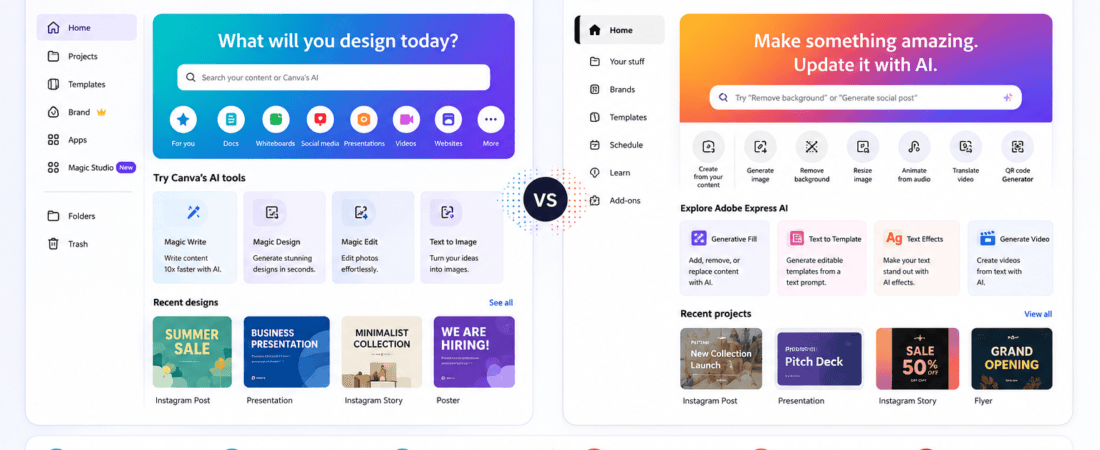
Free Canva AI vs Adobe Express AI: Choosing between Canva AI and Adobe Express AI can be surprisingly difficult.
Both platforms are designed to make graphic design easier, especially for people who don’t want to spend hours working through complicated professional design software.
Both can help with social media graphics, presentations, posters, advertisements, thumbnails, flyers, marketing materials, and other visual content.
But they approach the design process differently.
Canva has built a huge reputation around simple, template-driven design and an extensive ecosystem of visual content. Adobe Express, meanwhile, benefits from Adobe’s broader creative ecosystem and focuses on making professional-looking content accessible through a simpler interface.
The question isn’t simply:
“Which one is better?”
A better question is:
“Which one is better for the type of graphics I actually create?”
For social media managers, bloggers, small businesses, creators, marketers, students, freelancers, and beginners, that distinction matters.
In this guide, I’ll compare Canva AI and Adobe Express AI across ease of use, AI features, templates, social media design, branding, image editing, video, collaboration, free plans, learning curve, and overall value.
I’ll also explain how I would approach real-world design tasks with each platform so you can decide which one fits your workflow.
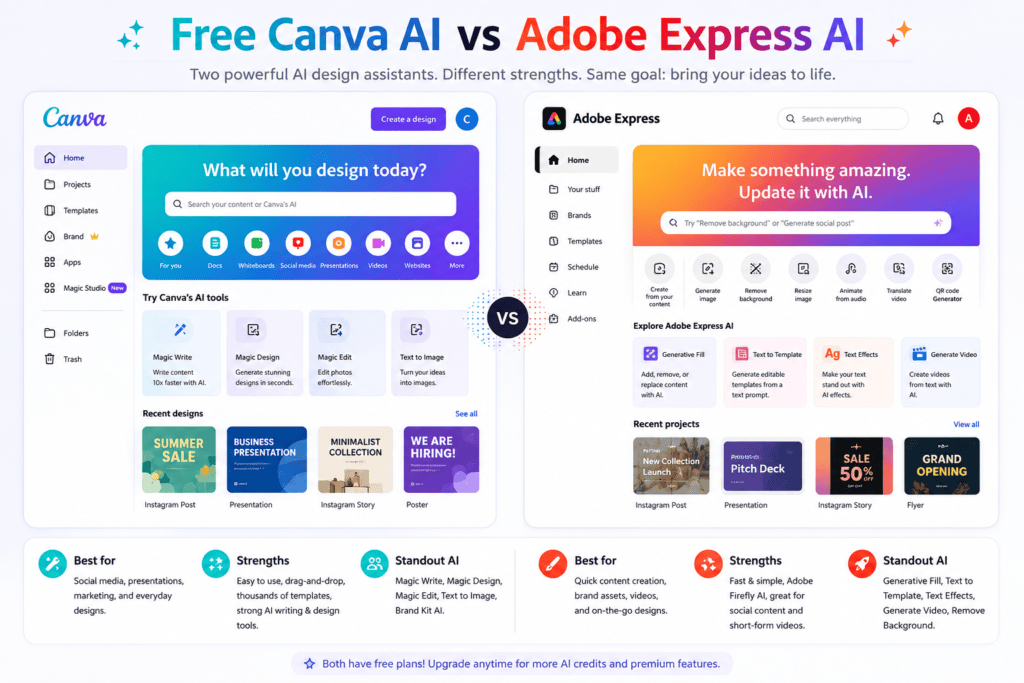
Canva AI vs Adobe Express AI: Quick Comparison
| Feature | Canva AI | Adobe Express AI |
|---|---|---|
| Beginner friendliness | Excellent | Excellent |
| Templates | Excellent | Excellent |
| Social media graphics | Excellent | Excellent |
| Brand design | Excellent | Excellent |
| AI-assisted design | Strong | Strong |
| Image editing | Strong | Strong |
| Adobe ecosystem | Limited | Excellent |
| Presentation design | Excellent | Good |
| Video content | Strong | Strong |
| Learning curve | Very low | Low |
| Best for beginners | Canva | Adobe Express |
| Best for Adobe users | Good | Excellent |
| Best for quick social graphics | Canva | Adobe Express |
| Best overall | Depends on workflow | Depends on workflow |
There isn’t one universal winner.
For someone who mainly creates Instagram posts, Pinterest graphics, carousels, and marketing visuals, Canva may feel more natural.
For someone who already works with Photoshop, Illustrator, Lightroom, Adobe Fonts, or other Adobe products, Adobe Express can be a more attractive choice.
What Is Canva AI?
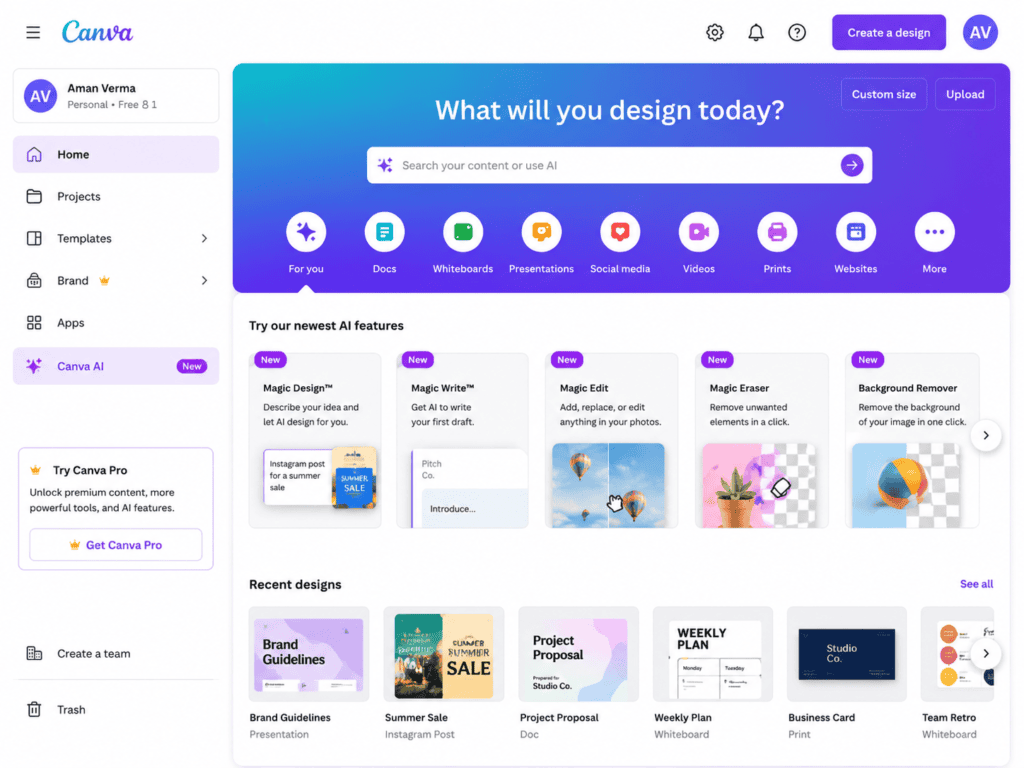
Canva is a browser-based graphic design platform built around templates, drag-and-drop editing, visual assets, presentations, social media designs, documents, and other creative formats.
Its AI features are integrated into the broader Canva workflow.
Depending on the feature and plan available, AI can help with:
- Generating design ideas
- Writing text
- Creating images
- Editing images
- Resizing designs
- Creating presentations
- Generating design variations
- Removing backgrounds
- Creating visual content
The biggest advantage is that the AI doesn’t exist in isolation.
It sits inside a design platform.
That means you can generate something and immediately continue editing it.
What Is Adobe Express AI?
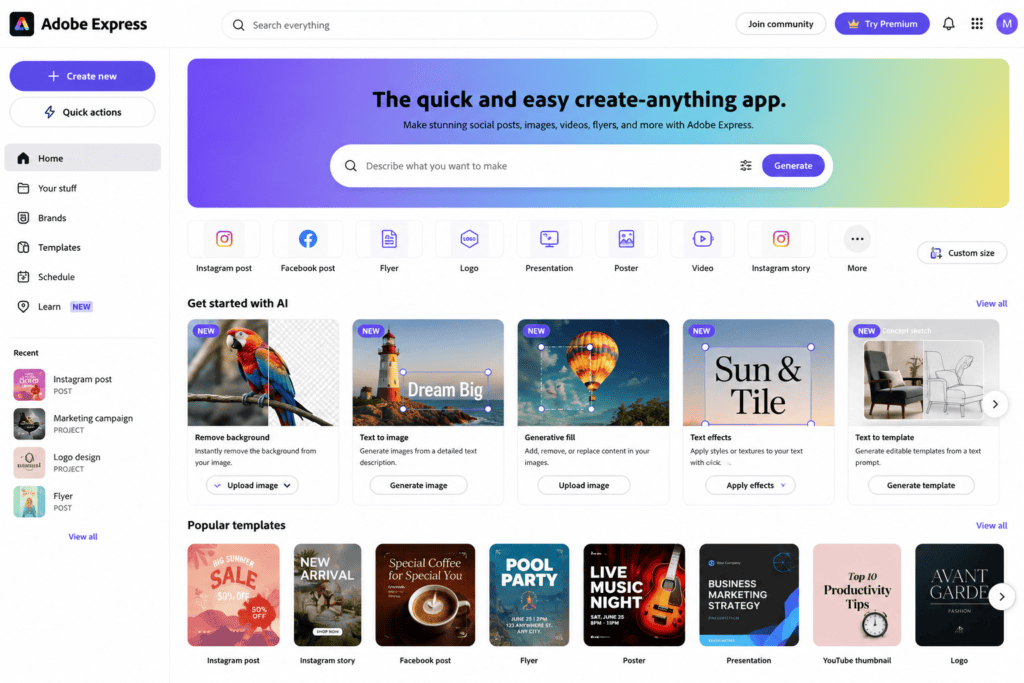
Adobe Express is Adobe’s more accessible content creation platform.
It brings together simplified design tools with Adobe’s creative ecosystem.
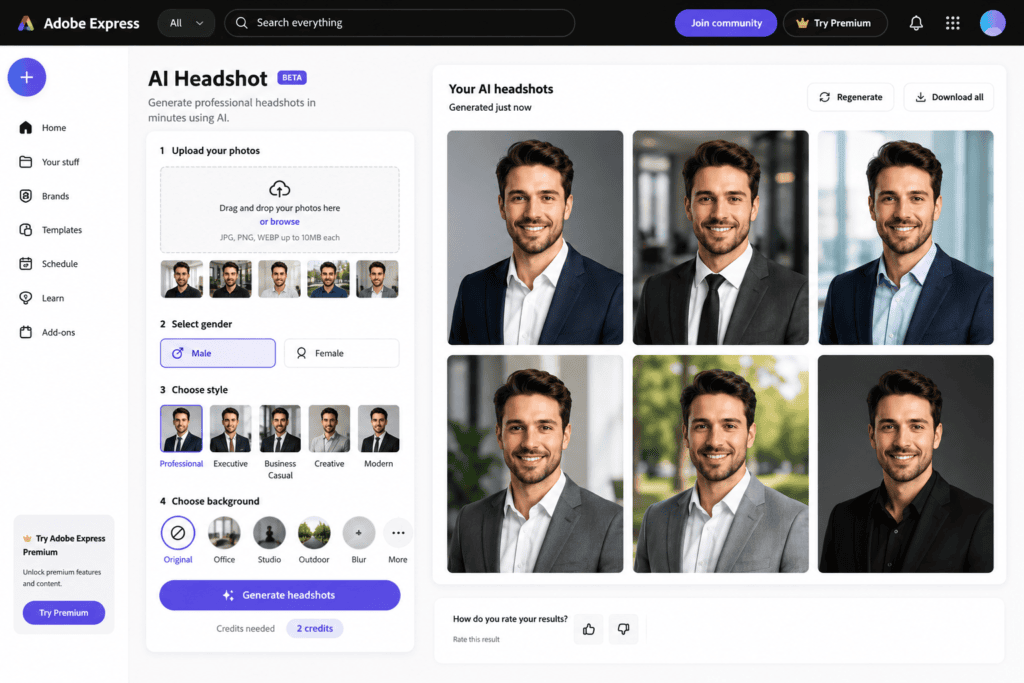
Its AI capabilities can help with:
- Text-to-image generation
- Generative editing
- Design creation
- Background removal
- Image manipulation
- Copy generation
- Social media content
- Video creation
- Templates
- Branding
One of Adobe Express’s biggest advantages is its relationship with the wider Adobe ecosystem.
If you’re already familiar with Adobe products, that can make the platform particularly attractive.
Canva AI vs Adobe Express AI: Which Is Easier to Use?
For beginners, ease of use matters enormously.
You can have hundreds of advanced features, but if it takes 30 minutes to figure out how to create a simple Instagram post, those features aren’t very useful.
Canva
My approach with Canva would be extremely straightforward.
I can choose:
Instagram Post → Template → Edit Text → Replace Image → Apply Brand Colors → Export
The interface is designed around visual simplicity.
That’s one of Canva’s biggest strengths.
Adobe Express
Adobe Express also focuses on simplicity, but it can feel slightly more connected to Adobe’s broader creative ecosystem.
For someone completely new to design, I would probably spend a little time exploring the interface before starting a larger project.
Winner for beginners: Canva
If your priority is getting started as quickly as possible, Canva has an advantage.
Canva AI vs Adobe Express AI for Social Media Graphics
This is where the comparison gets interesting.
Social media designers often need to produce a large number of graphics quickly.
You might need:
- Instagram posts
- Stories
- Reels covers
- Facebook posts
- LinkedIn graphics
- Pinterest pins
- TikTok visuals
- YouTube thumbnails
Canva workflow
If I were creating a social media calendar, I’d start by defining the visual system.
For example:
Brand colors: Black, white, orange
Fonts: One headline font + one body font
Style: Modern and minimal
Then I’d create a master design.
From there, I could create variations for different posts.
The template-driven workflow is extremely useful for repetitive content.
Adobe Express workflow
With Adobe Express, I’d follow a similar process but would also take advantage of Adobe-related assets and creative capabilities where relevant.
If the brand already uses Adobe Fonts, Adobe Stock, or other Adobe tools, that integration can make the workflow more attractive.
Winner for social media: Canva
For most social media managers, I would give Canva the advantage because of its huge template ecosystem and straightforward workflow.
Canva AI vs Adobe Express AI for AI Image Generation
Both platforms have AI image-generation capabilities.
But the quality of an AI image isn’t the only factor.
What matters is:
- How easily you can edit it
- Whether it fits the design
- How quickly you can generate variations
- How well the tool integrates generation with layout
- Whether your plan includes the feature
Canva
My workflow would be:
- Generate the image
- Add it to the design
- Remove or edit the background
- Add typography
- Adjust composition
- Export
This is convenient because everything stays inside one design environment.
Adobe Express
Adobe Express can also fit AI-generated imagery into a broader Adobe-oriented workflow.
If I want a more Adobe-centered creative environment, I’d consider it particularly attractive.
Winner: Tie
For basic AI graphics, I wouldn’t choose a platform solely because of image generation.
I’d choose based on the complete workflow.
Canva AI vs Adobe Express AI for Image Editing
This is one area where Adobe has an obvious heritage.
Adobe has spent decades building professional image-editing technology.
Adobe Express simplifies that ecosystem for everyday content creation.
Canva
Canva is excellent for quick edits.
For example:
- Background removal
- Cropping
- Filters
- Adjustments
- Simple object editing
- Design integration
If I need to clean up a product image for Instagram, I can usually do it quickly.
Adobe Express
Adobe Express can be particularly appealing when I want Adobe-style editing capabilities without opening a much more complicated application.
Its generative editing features can also be useful for modifying visual content.
Winner for advanced creative ecosystem: Adobe Express
For simple everyday editing, the difference may not matter much.
Which Is Better for Beginners?
If someone tells me:
“I’ve never used graphic design software. I need to create social media posts.”
I’d probably recommend Canva first.
The interface is approachable, and templates make the learning curve small.
Adobe Express is also beginner-friendly, but someone who has never used Adobe products may need a little more time to understand the ecosystem.
Winner: Canva
Which Is Better for Professional Designers?
This is more complicated.
Professional designers often use:
- Photoshop
- Illustrator
- InDesign
- After Effects
- Premiere Pro
- Lightroom
If your workflow already revolves around Adobe, Adobe Express can complement that ecosystem.
But neither Canva nor Adobe Express should automatically replace professional desktop applications for complex design work.
For example, if I need:
- Advanced vector illustration
- Complex photo manipulation
- Detailed typography control
- Sophisticated print production
- Advanced compositing
I’d still consider dedicated professional applications.
Winner: Adobe Express for Adobe-centered workflows
Canva AI vs Adobe Express for Branding
Brand consistency matters for businesses.
A company might have:
- Logo
- Brand colors
- Fonts
- Photography style
- Graphic elements
- Tone of voice
Canva
I can create a brand system and use it across multiple designs.
This is particularly useful for social media teams.
For example:
Monday: Instagram post
Tuesday: Story
Wednesday: Carousel
Thursday: Facebook graphic
All can use the same visual language.
Adobe Express
Adobe Express also supports branded content workflows.
If the company already uses Adobe’s creative ecosystem, this can be a strong advantage.
Winner: Tie
For small businesses, Canva may feel easier.
For Adobe-heavy organizations, Adobe Express may make more sense.
Canva AI vs Adobe Express for Presentations
Canva is particularly strong here.
Presentations are deeply integrated into Canva’s ecosystem.
I can build:
- Pitch decks
- Business presentations
- Educational slides
- Portfolio presentations
- Marketing reports
- Proposal decks
The templates make the process approachable.
Adobe Express can create presentation-style content, but Canva generally feels more purpose-built for this workflow.
Winner: Canva
Which Is Better for Posters and Flyers?
Both can handle posters and flyers.
Canva
I would choose a template close to my desired design and customize it.
For example:
Restaurant promotion
Headline:
Weekend Pizza Deal
Then:
- Product image
- Price
- Offer
- CTA
- Location
The template system makes it easy.
Adobe Express
Adobe Express can also create flyers and promotional graphics using templates.
If I want to connect the design with Adobe’s broader creative assets, I might choose Express.
Winner: Canva for simplicity
Canva AI vs Adobe Express for Video
Both platforms have moved beyond static graphics.
You can create:
- Short videos
- Reels
- Social ads
- Promotional clips
- Animated posts
- Video presentations
Canva
I find the template-based approach particularly useful for social videos.
You can start with a template and replace:
- Text
- Images
- Videos
- Music
- Branding
Adobe Express
Adobe Express also provides accessible video creation features.
For someone already using Adobe products, it can fit naturally into their broader workflow.
Winner: Tie
The best option depends on your preferred interface.
Canva AI vs Adobe Express for Content Creators
Content creators often need speed.
Imagine a creator who publishes:
- 5 Instagram posts
- 3 Reels
- 10 Stories
- 2 Pinterest pins
- 1 YouTube thumbnail
every week.
The ability to duplicate designs and maintain consistency is extremely important.
Canva is particularly strong here.
I could create a template library for:
- Quotes
- Announcements
- Tips
- Reels covers
- Product promotions
- Testimonials
Then reuse the same visual system.
Winner: Canva
Canva AI vs Adobe Express for Small Businesses
Small businesses usually don’t need complicated design software.
They need results.
A restaurant might need:
- Menu graphics
- Offers
- Social posts
- Stories
- Event posters
A salon might need:
- Service promotions
- Before-and-after posts
- Price lists
- Appointment graphics
An online store might need:
- Product banners
- Sale graphics
- Social ads
- Product announcements
For these everyday tasks, Canva’s simplicity makes it very attractive.
Winner: Canva
Canva AI vs Adobe Express for Adobe Users
Now let’s reverse the question.
Suppose you’re already comfortable with Adobe products.
You understand:
- Adobe Fonts
- Photoshop
- Illustrator
- Lightroom
- Creative Cloud
In that situation, Adobe Express may feel more natural.
You don’t necessarily need to move away from the Adobe ecosystem to create quick social content.
Winner: Adobe Express
Free Plans: What Should You Watch?
This is important.
“Free AI tool” doesn’t always mean unlimited AI usage.
Platforms frequently change:
- AI credits
- Free templates
- Storage limits
- Export options
- Premium assets
- Background-removal limits
- AI generation limits
- Collaboration features
So before building your entire workflow around one feature, check the current free-plan terms.
The best approach is to treat free plans as a way to determine whether the platform fits your workflow.
Which Has Better Templates?
Canva has one of its strongest advantages here.
The template ecosystem is enormous.
You can find templates for almost every common content format.
Examples include:
- YouTube
- Presentations
- Posters
- Flyers
- Business cards
- Resumes
- Invitations
- Menus
Adobe Express also has a substantial template collection.
Winner: Canva
Which Has Better Design Flexibility?
This depends on what you mean by flexibility.
For beginners:
Canva feels extremely flexible because everything is easy to manipulate.
For someone already working in Adobe’s ecosystem:
Adobe Express can provide a more natural connection to professional creative workflows.
Neither platform is intended to replace every professional design application.
Which Is Better for Graphic Designers?
If you’re a graphic designer, I’d think about your workflow rather than choosing based on hype.
If you need to create:
- Social media content
- Quick marketing graphics
- Presentations
- Templates
- Client mockups
Canva can be extremely efficient.
If your workflow includes:
- Photoshop
- Illustrator
- Adobe Fonts
- Adobe Stock
- Creative Cloud
Adobe Express may fit better.
Canva AI vs Adobe Express for AI Copywriting
Both platforms can assist with text creation.
For example, I might need:
Instagram caption
or:
Product headline
or:
Advertisement copy
AI can produce a starting point.
But I wouldn’t publish AI-generated marketing copy without editing it.
The best workflow is:
AI draft → Human editing → Brand voice → Fact-check → Publish
This prevents your content from sounding generic.
Which Tool Is Better for AI-Assisted Branding?
Let’s imagine I’m launching a new clothing brand.
I need:
- Logo
- Colors
- Fonts
- Instagram templates
- Story templates
- Product graphics
- Sale banners
Canva makes it easy to establish a visual system and reuse it.
Adobe Express is also capable, particularly if the brand already operates inside Adobe’s ecosystem.
Winner for beginners: Canva
Winner for Adobe users: Adobe Express
Which Is Better for Freelancers?
For freelancers, the decision depends on your clients.
If most clients need:
- Social media posts
- Carousels
- Stories
- Presentations
- Flyers
Canva may save a lot of time.
If your clients already use Adobe products, Adobe Express can be a valuable addition.
A smart freelancer can actually learn both.
Canva AI vs Adobe Express: Pricing Considerations
The free versions are useful for getting started, but premium features can vary.
Before choosing a platform, compare:
- AI generation limits
- Premium templates
- Stock assets
- Export options
- Brand features
- Storage
- Collaboration
- Background removal
- Resize features
- Commercial-use terms
Don’t choose based only on a “free” label.
Choose based on the features you actually use.
My Practical Test: Create the Same Graphic in Both
If I’m genuinely unsure which platform fits me, I’d run a simple test.
Create the same project twice.
For example:
Instagram promotional post
Brief:
“Create a modern promotional graphic for a coffee shop’s weekend offer. Use a premium but friendly style. Include the offer, product image, date, and CTA.”
Then create it in Canva.
Create the same design in Adobe Express.
Compare:
- Time required
- Ease of editing
- Templates
- AI assistance
- Image quality
- Typography
- Brand controls
- Export
- Overall workflow
The platform that gets you to the final design faster is probably the better tool for your needs.
Canva AI vs Adobe Express: My Recommendation by User Type
For social media managers
Canva
Its template ecosystem and quick workflow are major advantages.
For beginners
Canva
The interface is extremely approachable.
For influencers
Canva
Excellent for media kits, posts, stories, carousels, and thumbnails.
For small businesses
Canva
Especially useful when one person handles marketing and design.
For freelancers
Canva or Adobe Express
Choose based on client requirements.
For Adobe professionals
Adobe Express
The ecosystem advantage can be significant.
For advanced designers
Adobe Express + professional Adobe apps
Express can complement rather than replace advanced software.
For presentations
Canva
It has a strong presentation workflow.
A Simple Workflow for Using Canva AI
If I were using Canva for everyday content, my workflow would look like this:
Step 1
Define the content objective.
Step 2
Choose the format.
Step 3
Create or select a template.
Step 4
Use AI where it saves time.
Step 5
Replace generic visuals with brand-specific assets.
Step 6
Apply brand colors and fonts.
Step 7
Check spacing and typography.
Step 8
Proofread.
Step 9
Export.
The important part is that AI is assisting the design process rather than making every creative decision.
A Simple Workflow for Using Adobe Express AI
My approach would be similar:
Step 1
Define the campaign.
Step 2
Choose the content format.
Step 3
Start with a template or AI-assisted design.
Step 4
Generate or edit visual assets.
Step 5
Apply branding.
Step 6
Refine typography.
Step 7
Check the visual hierarchy.
Step 8
Proofread.
Step 9
Export the final asset.
Again, the final quality depends heavily on human editing.
Don’t Let AI Make Your Graphics Look Generic
This is one of the biggest problems with AI-assisted design.
If you simply type:
“Create a professional Instagram post.”
you’ll probably get something generic.
Instead, specify:
- Target audience
- Brand personality
- Visual style
- Colors
- Typography
- Content objective
- Product
- CTA
- Platform
For example:
“Create a clean Instagram promotional graphic for a Pakistani pizza restaurant targeting university students aged 18–25. Use a bold youthful layout, strong food photography, high contrast, minimal text, and a clear weekend offer CTA. Leave enough space for the restaurant logo.”
That gives the AI much more useful direction.
Human Design Skills Still Matter
AI can make design faster.
It doesn’t eliminate design principles.
You still need to understand:
- Hierarchy
- Alignment
- Contrast
- White space
- Typography
- Color
- Composition
- Branding
If everything is large and bold, nothing is important.
If every element has a different font, the design becomes chaotic.
AI can produce a layout.
You still need to judge whether the layout communicates effectively.
Common Mistakes When Comparing Canva and Adobe Express
Mistake 1: Choosing based only on AI
AI is only one part of the platform.
Mistake 2: Ignoring templates
Templates can save more time than AI generation.
Mistake 3: Assuming free means unlimited
Free plans have limitations.
Mistake 4: Using too many AI-generated visuals
Your brand can start looking generic.
Mistake 5: Forgetting brand consistency
Every post shouldn’t look completely different.
Mistake 6: Using AI copy without editing
It can sound repetitive.
Mistake 7: Expecting beginner tools to replace professional software
Complex projects may still require Photoshop, Illustrator, or other specialized applications.
Canva AI vs Adobe Express AI: Final Verdict
So, which is better?
For most beginners and social media creators, I would choose Canva.
It’s easy to understand, has an enormous template ecosystem, and makes it simple to produce a large volume of social media and marketing graphics.
For someone already invested in Adobe’s creative ecosystem, Adobe Express can be the better choice.
Its connection to Adobe’s wider creative tools makes it especially interesting for designers and teams already using Adobe products.
Here’s how I’d summarize it:
Choose Canva if you want:
- Simplicity
- Fast social media design
- Lots of templates
- Presentations
- Easy branding
- Beginner-friendly workflows
- Fast content production
Choose Adobe Express if you want:
- Adobe ecosystem integration
- Adobe-oriented creative workflows
- Quick social content
- Generative creative features
- Professional creative assets
- A simpler Adobe experience
And if you’re a designer who creates content for multiple types of clients?
Learn both.
The platforms overlap enough that learning one makes the other easier to understand.
The real advantage isn’t choosing the “winner.”
It’s knowing which tool to open for the specific job.
If I need to produce ten Instagram graphics quickly, I’d lean toward Canva.
If I’m already working with Adobe assets and want a lightweight Adobe workflow, I’d lean toward Express.
If I’m creating advanced photo manipulation or vector artwork, I’d move into professional Adobe applications.
That’s ultimately the most practical answer.
Canva wins for simplicity and everyday content production. Adobe Express wins for Adobe ecosystem integration and users who want a lightweight extension of Adobe’s creative environment.
For graphics, both are capable.
The better one is the tool that lets you turn your idea into a finished, on-brand design with the least friction.
Frequently Asked Questions
Is Canva AI better than Adobe Express AI?
Neither is universally better. Canva is generally more appealing for beginners, social media managers, and template-driven content creation, while Adobe Express can be particularly attractive to users already working within Adobe’s ecosystem.
Is Canva AI free?
Canva offers a free plan, but some AI features, premium assets, and usage limits can depend on the current plan. Check Canva’s current pricing and feature availability before relying on a specific AI feature.
Is Adobe Express AI free?
Adobe Express offers free access with limitations, while some advanced features may require a paid plan. Features and limits can change over time.
Which is better for Instagram posts?
Canva is an excellent choice for Instagram posts because of its large template library and easy-to-edit layouts.
Which is better for professional graphic designers?
It depends on the workflow. Adobe Express can be more attractive for designers already using Adobe’s ecosystem, while Canva can be extremely efficient for high-volume marketing and social media work.
Can Canva and Adobe Express replace Photoshop?
For simple marketing graphics, they can replace the need for Photoshop in many workflows. They are not complete replacements for advanced image editing, complex compositing, or professional design work.
Which is better for social media managers?
Canva is usually the easier choice for social media managers who need to create large amounts of branded content quickly.
Which has better templates?
Canva has a particularly large and diverse template ecosystem. Adobe Express also offers many templates, so the best choice depends on the specific content you create.
Can I use AI-generated graphics commercially?
Commercial-use rights depend on the specific tool, asset, feature, and plan. Always check the platform’s current licensing terms before using AI-generated content commercially, especially for client work or paid advertising.
Should I learn both Canva and Adobe Express?
If you work professionally with graphics, learning both can be useful. Canva is especially valuable for fast marketing content, while Adobe Express can complement Adobe-based workflows.
Check out here if you want to know about ChatGPT Free vs Google Gemini: Best AI Tool for Blog Research?