
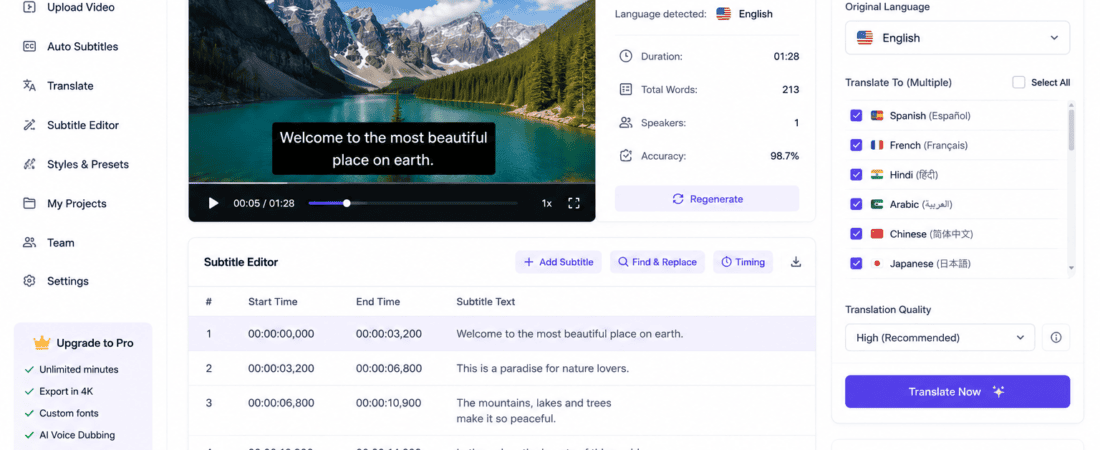
How to Auto Generate Subtitles in Multiple Languages Using AI
Video content has become the most powerful way to reach audiences worldwide. Whether you create YouTube videos, TikTok clips, Instagram Reels, Facebook videos, online courses, or marketing campaigns, subtitles can dramatically improve engagement, accessibility, and global reach.
Creating subtitles manually, however, is time-consuming and often expensive. Fortunately, modern AI subtitle generators can automatically transcribe speech, synchronize captions, and even translate subtitles into dozens of languages within minutes.
In this comprehensive guide, you’ll learn how to auto generate subtitles in multiple languages using AI, discover the best AI subtitle tools, understand their features, and follow a step-by-step workflow to make your videos accessible to viewers around the world.
Why AI Subtitles Matter
Many viewers watch videos without sound, especially on mobile devices and social media platforms. AI-generated subtitles help ensure your message is understood even when audio is muted.
Benefits include:
- Improved accessibility for people with hearing impairments
- Higher video watch time
- Better audience retention
- Increased engagement
- Greater global reach through multilingual subtitles
- Improved SEO for searchable video content
- Faster content localization
- Reduced production costs
- Better learning experience for educational videos
What Is an AI Subtitle Generator?
An AI subtitle generator uses speech recognition and natural language processing (NLP) to:
- Convert spoken audio into text
- Detect different speakers
- Synchronize captions with video timing
- Translate subtitles into multiple languages
- Export subtitle files such as SRT, VTT, or TXT
- Allow manual editing for accuracy
Instead of typing every subtitle by hand, AI automates most of the work, saving hours of effort.
How AI Subtitle Generation Works
Most AI subtitle tools follow a similar process:
Step 1: Upload Your Video
Import your video in formats such as:
- MP4
- MOV
- AVI
- MKV
- WEBM
Step 2: AI Speech Recognition
The AI listens to your video’s audio and converts spoken words into text.
Modern AI systems can recognize:
- Different accents
- Multiple speakers
- Background noise (to some extent)
- Natural pauses
- Punctuation
Step 3: Subtitle Synchronization
The AI automatically aligns each subtitle with the correct timestamp, ensuring captions appear at the right moment.
Step 4: Translation
Many AI subtitle generators can instantly translate captions into dozens of languages, helping creators reach international audiences.
Step 5: Export
Download subtitles in formats like:
- SRT
- VTT
- TXT
- Burned-in subtitles
- Editable captions
Best AI Tools for Auto-Generating Multilingual Subtitles
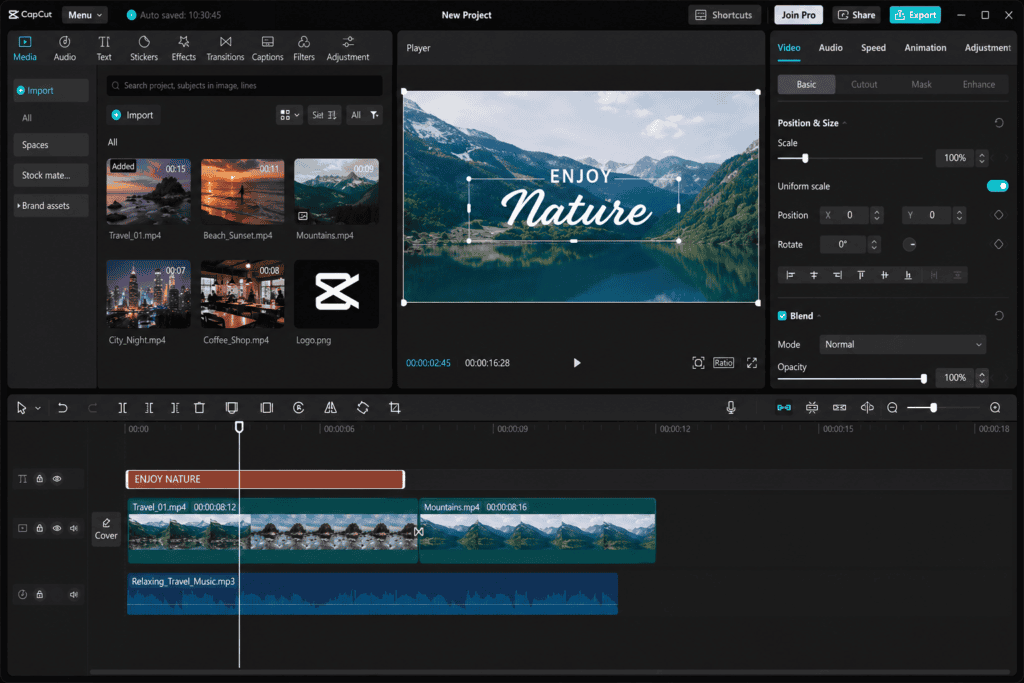
1. CapCut AI
CapCut offers one of the easiest ways to create subtitles for short-form videos. Its AI-powered auto-caption feature can detect speech, generate subtitles, and translate them into multiple languages.
Features
- Automatic subtitle generation
- Subtitle translation
- Caption styling
- Animated text
- Font customization
- One-click editing
Best For
- TikTok creators
- Instagram Reels
- YouTube Shorts
- Facebook Reels
Free Plan
Yes
Pros
- Beginner-friendly
- Fast processing
- Mobile and desktop support
- Stylish caption templates
Cons
- Some advanced AI features require a premium subscription
2. VEED.io
VEED.io is a browser-based video editor with powerful AI subtitle tools. It automatically creates captions and supports multilingual translation, making it ideal for content creators who prefer online editing.
Features
- AI transcription
- Subtitle generation
- Translation into multiple languages
- Subtitle editing
- Video editing
- Team collaboration
Best For
- Marketing teams
- Educators
- Businesses
- YouTubers
Free Plan
Available
Advantages
- Easy-to-use interface
- Cloud-based editing
- Multiple export options
Drawbacks
- Free version includes some limitations
3. Descript
Descript combines AI transcription, subtitle generation, podcast editing, and video editing into a single platform. It is especially popular among podcasters and educators.
Features
- AI transcription
- Auto captions
- Subtitle editing
- Speaker detection
- Audio editing
- Screen recording
Best For
- Podcasts
- Online courses
- Interviews
- Educational content
Free Version
Yes
Pros
- Highly accurate transcription
- Professional editing tools
- Intuitive workflow
Cons
- Advanced features require a paid plan
4. Rask AI
Rask AI specializes in AI-powered translation and multilingual video localization. It is an excellent choice for creators who want to publish videos in multiple languages without recording new voiceovers.
Features
- Subtitle translation
- AI dubbing
- Lip-sync support
- Voice cloning
- Multiple language support
Best For
- Businesses
- YouTubers
- Online educators
- Global marketing campaigns
Free Plan
Limited trial available
Pros
- Excellent translation quality
- Supports many languages
- Saves localization costs
Cons
- Most advanced tools require a subscription
5. Subtitle Edit AI
Subtitle Edit AI helps users generate, edit, and fine-tune subtitles with greater control. It is particularly useful for creators who want to review timing and formatting before publishing.
Features
- Automatic subtitle generation
- Timing adjustments
- Manual editing
- Subtitle synchronization
- Export in multiple formats
Best For
- Video editors
- Film creators
- Professional subtitling
Advantages
- Flexible editing tools
- Multiple subtitle formats
- Detailed customization
Drawbacks
- Interface may feel advanced for beginners
Best Practices for AI-Generated Subtitles
To achieve professional results:
- Review captions for accuracy.
- Correct names and technical terms.
- Use readable fonts and colors.
- Keep subtitles concise.
- Avoid covering important visuals.
- Maintain consistent timing.
- Test subtitles on mobile devices.
- Proofread translated captions before publishing.
6. Happy Scribe
Happy Scribe is a well-known AI transcription and subtitle platform trusted by content creators, journalists, educators, and businesses. It supports automatic transcription and subtitle translation into numerous languages.
Key Features
- AI transcription
- Automatic subtitle generation
- Subtitle translation
- Speaker identification
- Subtitle editor
- SRT, VTT, TXT, and Word export
- Team collaboration
Best For
- YouTubers
- Journalists
- Online educators
- Corporate training
Free Plan
Limited free trial available.
Pros
- High transcription accuracy
- Easy subtitle editing
- Supports many languages
- Professional export options
Cons
- Free usage is limited.
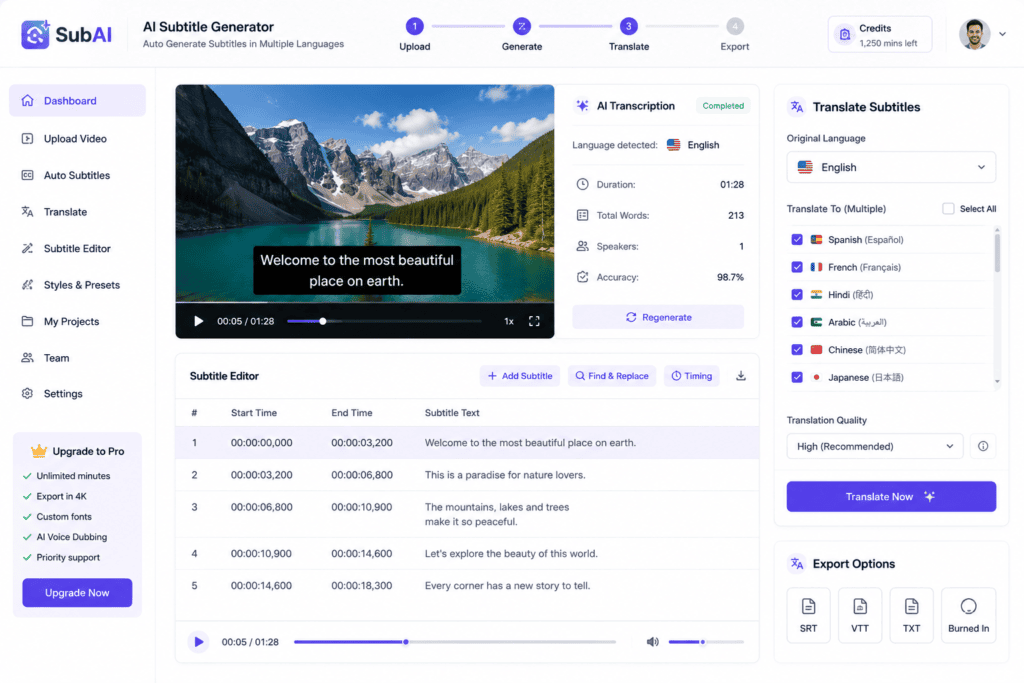
7. Maestra AI
Maestra AI is an all-in-one solution for transcription, subtitle generation, translation, and AI voiceovers. It helps creators localize videos for global audiences quickly.
Features
- Automatic subtitles
- AI translation
- AI voiceover
- Subtitle customization
- Team collaboration
- Cloud storage
Best For
- Agencies
- Businesses
- Online courses
- Marketing teams
Free Version
Limited trial available.
Advantages
- Supports many languages
- Clean interface
- Fast subtitle generation
- Professional-quality translations
Drawbacks
- Premium features require a subscription.
8. Kapwing AI
Kapwing is an online video editor with integrated AI captioning tools. It enables users to generate subtitles, edit captions, and publish videos directly from the browser.
Features
- Auto captions
- Subtitle editing
- AI translation
- Video trimming
- Social media templates
- Collaborative editing
Best For
- Social media creators
- Small businesses
- Marketing teams
- Beginners
Free Plan
Yes.
Pros
- Browser-based
- User-friendly interface
- No software installation
- Fast workflow
Cons
- Free exports may have limitations.
9. Adobe Premiere Pro AI
Adobe Premiere Pro includes AI-powered features through Adobe Sensei that make subtitle generation significantly faster. Professional editors can automatically transcribe speech and generate captions directly inside the editing timeline.
Features
- AI speech-to-text
- Automatic captions
- Caption styling
- Timeline editing
- Multiple export formats
- Professional editing tools
Best For
- Professional video editors
- Filmmakers
- Agencies
- Production companies
Free Version
Free trial available.
Advantages
- Excellent accuracy
- Integrated editing workflow
- Professional customization
- Reliable performance
Drawbacks
- Requires a subscription after the trial period.
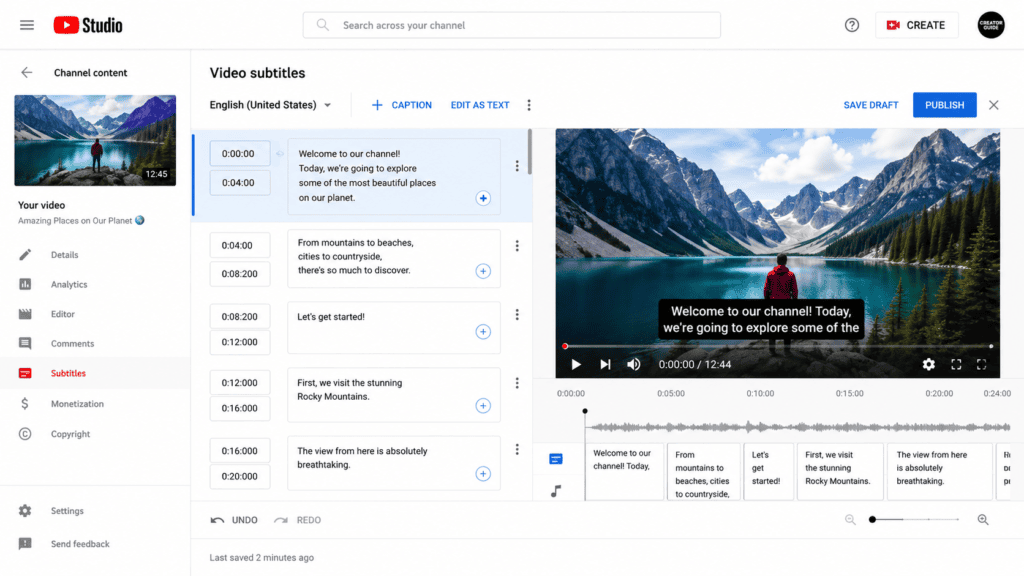
10. YouTube Studio
If you’re publishing videos on YouTube, YouTube Studio offers automatic caption generation at no additional cost. You can review, edit, and improve AI-generated subtitles before making them public.
Features
- Automatic captions
- Subtitle editing
- Multiple language support
- Community subtitle uploads
- Manual subtitle upload
Best For
- YouTube creators
- Educational channels
- Businesses
- Vloggers
Free Plan
Completely free for YouTube uploads.
Pros
- No additional software required
- Easy editing
- Integrated into YouTube
- Good accuracy for clear audio
Cons
- Features are limited to YouTube content.
Step-by-Step Guide to Generate Multilingual AI Subtitles
Follow this simple workflow to create subtitles in multiple languages.
Step 1: Prepare Your Video
Before uploading your video:
- Use clear audio.
- Reduce background noise.
- Speak at a natural pace.
- Use a quality microphone whenever possible.
Better audio generally leads to more accurate AI transcription.
Step 2: Upload Your Video
Open your preferred AI subtitle tool and upload your video file.
Common supported formats include:
- MP4
- MOV
- AVI
- MKV
- WEBM
Most tools also support drag-and-drop uploads.
Step 3: Select the Original Language
Choose the language spoken in your video. This helps the AI transcribe speech more accurately.
Examples include:
- English
- Urdu
- Hindi
- Spanish
- French
- German
- Arabic
- Chinese
- Japanese
Step 4: Generate Automatic Captions
Start the AI transcription process. Depending on the video’s length, subtitle generation usually takes from a few seconds to several minutes.
The AI will automatically:
- Detect speech
- Convert speech into text
- Add punctuation
- Synchronize timestamps
Step 5: Review and Edit
Although AI transcription is highly accurate, it’s important to review the results.
Check for:
- Spelling mistakes
- Brand names
- Technical terminology
- Proper nouns
- Timing issues
- Grammar corrections
Small edits can significantly improve subtitle quality.
Step 6: Translate into Multiple Languages
Choose the languages you want to translate your subtitles into.
Popular choices include:
- Spanish
- French
- German
- Portuguese
- Arabic
- Hindi
- Urdu
- Chinese
- Japanese
- Korean
Many AI tools generate translations with just one click.
Step 7: Customize Subtitle Appearance
Improve readability by adjusting:
- Font style
- Font size
- Text color
- Background color
- Caption position
- Animation effects
Make sure subtitles remain easy to read on mobile devices.
Step 8: Export Your Video or Subtitle File
Most AI subtitle tools allow you to export:
- SRT
- VTT
- TXT
- Burned-in subtitles
- Editable caption files
Choose the format that best fits your publishing platform.
Tips to Improve Subtitle Accuracy
To achieve better results with AI-generated subtitles:
- Record in a quiet environment.
- Use a high-quality microphone.
- Avoid people talking over each other.
- Speak clearly and naturally.
- Review AI-generated text before publishing.
- Correct translated subtitles if needed.
- Keep subtitle lines short for better readability.
- Test subtitles on both desktop and mobile devices.
Comparison Table
| AI Tool | Auto Captions | Translation | Free Plan | Best For |
|---|---|---|---|---|
| CapCut AI | ✅ | ✅ | Yes | Short-form videos |
| VEED.io | ✅ | ✅ | Yes | Online editing |
| Descript | ✅ | Limited | Yes | Podcasts & tutorials |
| Rask AI | ✅ | ✅ | Trial | Localization |
| Happy Scribe | ✅ | ✅ | Trial | Professional transcription |
| Maestra AI | ✅ | ✅ | Trial | Businesses |
| Kapwing | ✅ | ✅ | Yes | Social media |
| Adobe Premiere Pro | ✅ | Limited | Trial | Professional editing |
| YouTube Studio | ✅ | Limited | Yes | YouTube creators |
SEO Benefits of AI-Generated Multilingual Subtitles
Many creators overlook the SEO value of subtitles. Search engines cannot watch videos the way people do, but they can understand text. Accurate subtitles provide additional context that can improve discoverability.
1. Better Search Engine Visibility
When your video includes captions or transcripts, search engines can better understand the topics covered. This may improve visibility for relevant search queries.
2. Increased Watch Time
Many viewers watch videos with the sound muted, especially on social media. Clear subtitles help viewers follow along, which can increase watch time and retention.
3. Reach International Audiences
Translating subtitles into multiple languages makes your content accessible to viewers around the world without recording separate videos.
4. Improved Accessibility
Subtitles make videos more accessible for people who are deaf or hard of hearing, as well as viewers who prefer reading while watching.
5. Better User Experience
Readable, well-timed subtitles improve comprehension, especially in educational, technical, or fast-paced videos.
Best Practices for Multilingual AI Subtitles
Follow these tips to create professional-looking subtitles.
Keep Lines Short
Avoid long subtitle lines. Breaking text into shorter segments makes captions easier to read on mobile devices.
Use Easy-to-Read Fonts
Choose clean fonts with sufficient contrast against the video background.
Maintain Proper Timing
Each subtitle should remain on screen long enough for viewers to comfortably read it.
Review AI Translations
AI translation has improved significantly, but always proofread translations for names, technical terms, and cultural nuances.
Match the Speaker’s Tone
If your video has a casual tone, your translated subtitles should maintain that conversational style whenever appropriate.
Optimize for Vertical Videos
For TikTok, Instagram Reels, and YouTube Shorts, position subtitles where they won’t be hidden by platform interface elements such as buttons or captions.
Common Mistakes to Avoid
Even the best AI subtitle tools can produce errors if they’re used without review.
Avoid these common mistakes:
- Publishing subtitles without proofreading.
- Using fonts that are difficult to read.
- Displaying too much text at once.
- Ignoring subtitle timing.
- Covering important visuals with captions.
- Relying entirely on automatic translations.
- Leaving spelling or punctuation mistakes uncorrected.
- Using low-quality audio that reduces transcription accuracy.
Tips for Better AI Transcription Results
To improve subtitle quality from the start:
- Record in a quiet environment.
- Use a quality microphone.
- Speak clearly and at a steady pace.
- Avoid multiple people talking simultaneously.
- Reduce background music during spoken sections.
- Remove unnecessary filler words during editing.
- Review timestamps before exporting.
AI Subtitle Workflow for Content Creators
A simple workflow can help you save time while maintaining quality.
Step 1: Record Your Video
Use clear audio and proper lighting.
Step 2: Upload to an AI Subtitle Tool
Choose a platform such as CapCut, VEED.io, Descript, Happy Scribe, or Maestra AI.
Step 3: Generate Captions
Allow the AI to automatically transcribe your audio.
Step 4: Edit the Captions
Correct any transcription or timing issues.
Step 5: Translate into Multiple Languages
Generate translated subtitles for your target audiences.
Step 6: Customize Subtitle Style
Adjust font, color, size, and placement to match your branding.
Step 7: Export and Publish
Download the subtitle file or export the video with burned-in captions.
Frequently Asked Questions (FAQs)
What is the best free AI tool for generating subtitles?
CapCut, VEED.io, Descript, Kapwing, and YouTube Studio all offer free subtitle generation features, though each has different limits and capabilities.
Can AI translate subtitles into multiple languages?
Yes. Many AI subtitle tools support translation into dozens of languages, allowing creators to reach international audiences more efficiently.
Are AI-generated subtitles accurate?
Modern AI transcription is often highly accurate when the audio is clear. However, reviewing and editing the captions before publishing is still recommended.
Which subtitle format should I export?
The most common formats are:
- SRT – Widely supported across video platforms.
- VTT – Common for web-based video players.
- TXT – Useful for transcripts and editing.
Can I edit AI-generated subtitles?
Yes. Most AI subtitle tools provide an editor where you can adjust wording, timing, formatting, and translation before exporting.
Do subtitles improve video SEO?
Subtitles can improve accessibility and user experience, and transcripts may help search engines better understand video content. While subtitles alone don’t guarantee higher rankings, they can support an overall SEO strategy.
Final Verdict
AI subtitle generators have made video localization faster, more affordable, and more accessible than ever before. Whether you’re creating YouTube videos, Instagram Reels, TikTok clips, online courses, product demonstrations, or corporate presentations, AI can automate much of the subtitle creation process.
For beginners, CapCut AI and YouTube Studio offer simple workflows. VEED.io and Kapwing are excellent browser-based solutions for social media creators. Descript is ideal for podcasts and educational content, while Rask AI, Happy Scribe, and Maestra AI are strong choices for multilingual localization and professional translation.
The best results come from combining AI speed with human review. Always check transcription accuracy, refine translations, and ensure subtitles match your brand voice and audience expectations.
Conclusion
AI-powered subtitle generators have transformed the way creators produce multilingual video content. By automatically transcribing speech, synchronizing captions, and translating subtitles into multiple languages, these tools reduce manual work while helping videos reach a broader audience.
Whether you’re a beginner or an experienced creator, using AI for subtitle generation can improve accessibility, increase viewer engagement, and simplify global content distribution. Choose a tool that fits your workflow, review the AI-generated output carefully, and continue testing different subtitle styles to discover what resonates best with your audience.
With the rapid advancement of AI technology, multilingual subtitles are becoming an essential part of modern video production and an effective way to connect with viewers across different languages and regions.
Check out here if you want to know about Free AI Tools for Script Writing Short-Form Vertical Content (2026 Guide)