
Perplexity AI vs Google Search: Content research can quietly consume most of the time it takes to write an article.
You may start with a simple topic, search for a few sources, open several tabs, compare information, copy useful notes into a document, verify facts, and then realize that an hour has passed before you’ve even written the introduction.
This is where AI-powered search tools have changed the research process.
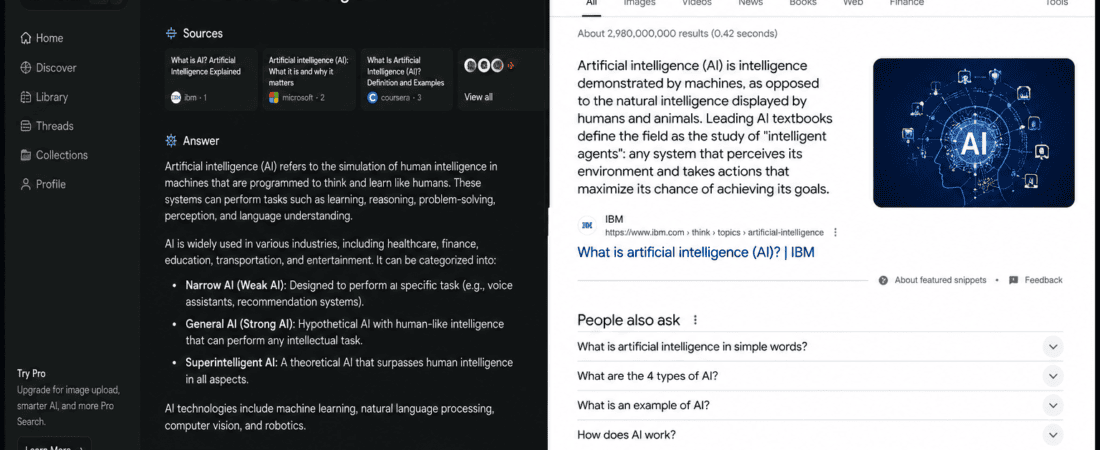
Instead of opening one search result after another, you can ask an AI search engine a question and receive a summarized answer with sources. Perplexity AI has become particularly popular for this type of research, while Google Search remains the default search engine for billions of everyday queries.
But which one is actually faster for content research?
The short answer is:
Perplexity is often faster for getting a research overview, while Google Search is usually better for finding specific sources, official pages, breaking information, and discovering a wide range of perspectives.
For content creators, however, speed isn’t the only factor.
A research tool needs to help you find reliable information, understand a topic, locate primary sources, verify claims, and collect enough material to produce genuinely useful content.
That’s why this comparison isn’t simply about which tool produces an answer faster.
We’ll compare Perplexity AI vs Google Search for blog research, keyword research, fact-checking, competitor research, finding statistics, source discovery, current information, SEO content, academic research, and long-form content creation.
We’ll also look at which tool makes more sense for bloggers, freelancers, SEO writers, researchers, and social media managers.
Perplexity AI vs Google Search: Quick Comparison
| Feature | Perplexity AI | Google Search |
|---|---|---|
| Search speed | Very fast for summarized answers | Very fast for finding results |
| Direct answers | Excellent | Good |
| Source discovery | Excellent | Excellent |
| Source diversity | Good | Excellent |
| Research summaries | Excellent | Limited |
| Follow-up questions | Excellent | Limited |
| Official sources | Good | Excellent |
| Breaking news discovery | Good | Excellent |
| Fact verification | Good | Excellent |
| Deep research workflow | Excellent | Good |
| Search operators | Limited compared with Google | Excellent |
| Academic research | Good | Excellent |
| Product research | Good | Excellent |
| SEO research | Excellent | Excellent |
| Competitor research | Good | Excellent |
| Easy for beginners | Excellent | Excellent |
| Best for quick overview | Perplexity | — |
| Best for broad discovery | — | |
| Best for source verification | — | |
| Best overall research workflow | Both | Both |
There isn’t a single winner for every situation.
The biggest difference is how the two tools present information.
What Is Perplexity AI?
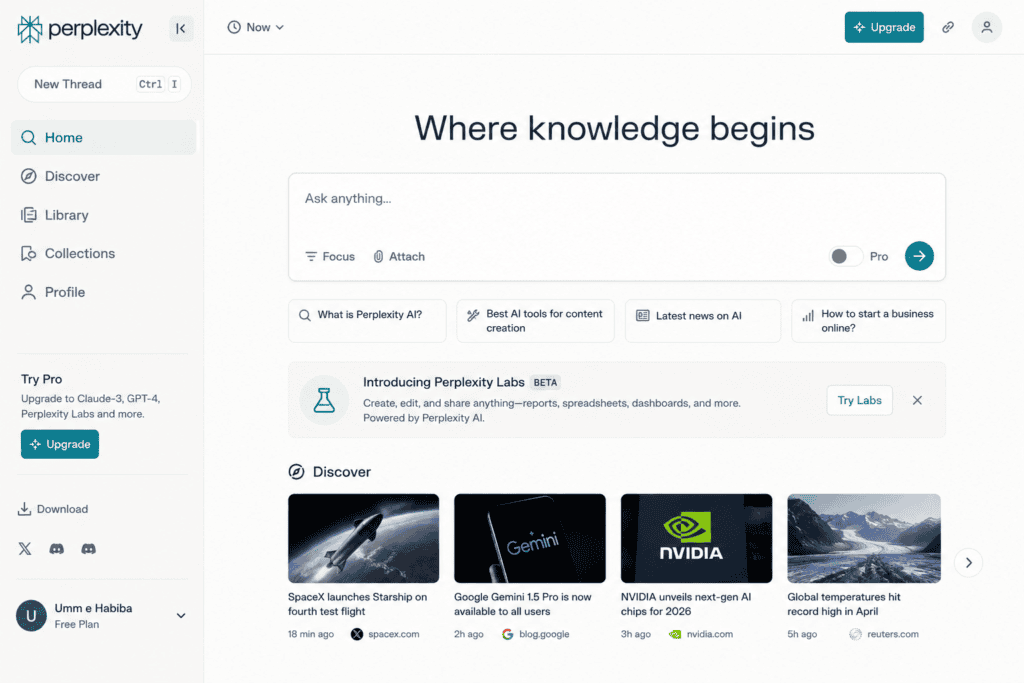
Perplexity is an AI-powered answer engine designed to search the web and provide conversational answers with citations.
Instead of giving you a traditional list of ten blue links, it attempts to synthesize information from multiple sources into a response.
That changes the research workflow.
Suppose I’m researching:
What are the biggest benefits of AI writing tools for small businesses?
With traditional search, I might search the phrase, open several articles, read them, compare claims, and take notes.
With Perplexity, I can ask the question directly and receive a structured answer with supporting sources.
The important part is that I can continue asking questions.
For example:
Which of these benefits are supported by recent studies?
Then:
Find examples from small businesses.
Then:
What are the biggest criticisms?
That conversational workflow is particularly useful when researching unfamiliar subjects.
What Is Google Search?
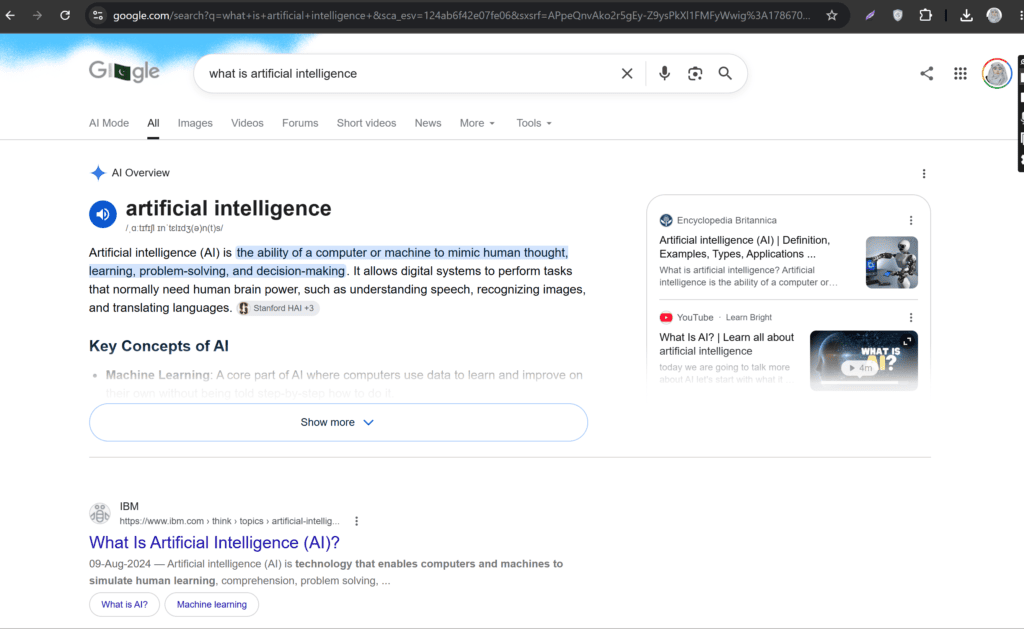
Google Search is a traditional web search engine.
You enter a query and Google returns relevant pages, websites, images, videos, news, maps, shopping results, and other information.
Its greatest strength is breadth.
Google doesn’t force you into one summarized interpretation of a topic.
Instead, it lets you explore the web yourself.
For content research, that can be extremely valuable.
You can search for:
- Government reports
- Research papers
- Company announcements
- Industry statistics
- News reports
- Expert interviews
- Official documentation
- Competitor websites
- Reddit discussions
- Videos
- Images
This makes Google especially useful when source quality and discovery matter more than convenience.
Perplexity AI vs Google Search: What Does “Faster” Actually Mean?
Before deciding which tool is faster, we need to define speed.
There are at least three types of research speed.
1. Discovery speed
How quickly can you find information?
2. Understanding speed
How quickly can you understand the information?
3. Verification speed
How quickly can you confirm whether the information is reliable?
Perplexity often wins the second category because it summarizes information.
Google frequently wins the first and third categories because it provides direct access to a huge variety of sources.
For a content creator, all three matter.
My Practical Perplexity Research Workflow
When approaching Perplexity as a content research tool, the biggest advantage is the ability to begin with a broad question rather than a carefully engineered search query.
For example:
What are the biggest trends in AI content creation in 2026?
The response can give me a starting point and references to investigate.
From there, I can narrow the research:
Which trend has the strongest evidence?
Then:
Give me recent examples.
Then:
Find primary sources supporting these claims.
This makes the process feel more like interviewing a research assistant than using a conventional search engine.
The important caveat is that I wouldn’t treat the generated summary as the final authority.
I’d open the cited sources and verify important claims myself.
That is especially important for statistics, dates, financial information, technical claims, and anything that could change quickly.
My Practical Google Search Workflow
Google takes a more traditional approach.
Suppose I’m researching:
Best free AI writing tools.
I might begin with:
best free AI writing tools
Then narrow it down:
free AI writing tools 2026
Then search specific tools.
Then search:
[tool name] pricing
Then:
[tool name] features
Then:
[tool name] official documentation
This requires more manual effort, but I get greater control over what I investigate.
If I want an official source, I can deliberately search for it.
If I want user opinions, I can search Reddit or forums.
If I want research papers, I can use Google Scholar.
If I want recent announcements, I can filter for recent results.
That’s a major advantage.
Which Is Faster for a Quick Topic Overview?
This is where Perplexity has a clear advantage.
Imagine you’re writing about a topic you’ve never researched before.
You don’t know:
- The important subtopics
- The terminology
- The major companies
- The common questions
- The recent developments
Instead of spending 30 minutes searching randomly, you can ask Perplexity for an overview.
It can help you understand the landscape quickly.
For example:
Explain the current state of AI video editing tools, including major categories, popular tools, advantages, limitations, and recent developments.
That can give you a useful starting framework for your research.
Winner: Perplexity
Which Is Faster for Finding Specific Information?
This depends on the query.
If I need a specific official document, Google can be faster.
For example:
OpenAI API pricing official
Google immediately gives me navigational results.
Similarly, if I’m looking for:
- A company’s official announcement
- Government statistics
- A specific PDF
- An official product page
- A particular research paper
Google’s traditional search model is extremely efficient.
Winner: Google Search
Perplexity AI vs Google Search for Blog Research
This is where the comparison becomes especially interesting.
A blogger doesn’t just need answers.
They need research material.
For example, if I’m writing:
How AI Is Changing Social Media Marketing
I need to research:
- Current trends
- Statistics
- Examples
- Expert opinions
- Case studies
- Tools
- Advantages
- Risks
- Future predictions
Perplexity is excellent for building the initial research map.
I can ask broad questions and follow up on interesting points.
Then I can use Google to find primary sources.
This creates a strong workflow:
Perplexity → discover → Google → verify → write
Winner: Both
Perplexity AI vs Google Search for Finding Statistics
Statistics require special care.
AI-generated summaries can sometimes present statistics without enough context.
For example, a statistic might refer to:
- A specific country
- A specific year
- A specific sample size
- A particular demographic
- A survey rather than measured behavior
That’s why I prefer using Perplexity to find the statistic and then opening the original report.
Google can also be excellent for this.
Search queries such as:
AI adoption statistics 2026 PDF
or:
site:gov AI statistics
can lead directly to primary sources.
Winner for discovery: Perplexity
Winner for verification: Google
Perplexity AI vs Google Search for Finding Primary Sources
Google has an important advantage here.
You can deliberately search for primary sources.
For example:
site:gov AI employment report
or:
site:edu artificial intelligence research
or:
site:company.com annual report AI
This gives you much more control.
Perplexity can surface primary sources too, but you should still inspect the citations rather than assuming the first source is the best source.
Winner: Google Search
Which Is Better for Fact-Checking?
Fact-checking requires more than receiving an answer.
You need evidence.
If an AI response says:
Company X launched a product in 2025.
I want to verify it through:
- Official announcement
- Company documentation
- Reputable news source
Google makes this easy because I can search the claim directly.
Perplexity can also be useful because it can quickly locate several sources discussing the claim.
But the final step should be opening the sources.
Winner: Google Search
Perplexity AI vs Google Search for SEO Research
Both can be useful for SEO.
Google gives you access to the actual search environment.
You can inspect:
- Search results
- Related searches
- People Also Ask
- Featured snippets
- Videos
- News
- Forums
- Competitors
This can reveal what searchers are actually being shown.
Perplexity is useful for understanding a topic semantically.
You can ask:
What questions do beginners usually have about technical SEO?
Then use the answers to expand your content outline.
A strong SEO workflow uses both.
Google: Search-result analysis
Perplexity: Topic understanding
Perplexity AI vs Google Search for Keyword Research
Neither should be treated as a complete keyword research platform.
Perplexity can help brainstorm keyword ideas.
For example:
Give me long-tail search queries people might use when looking for free AI video editors.
This can produce useful topic ideas.
Google can then validate those ideas through actual search behavior and search-result analysis.
For actual search volume and competition data, dedicated SEO platforms may be more appropriate.
Winner: Both
Which Is Better for Finding Long-Tail Topics?
Perplexity can be surprisingly useful for brainstorming.
You can ask:
Generate 50 specific questions beginners might ask about AI image generators.
Then group them into:
- Beginner questions
- Comparison questions
- Troubleshooting questions
- Pricing questions
- Tutorial topics
Google is better for validating whether those questions correspond to real search patterns.
Winner for brainstorming: Perplexity
Winner for validation: Google
Perplexity AI vs Google Search for Competitor Research
Google has an important advantage because it lets you inspect competitors directly.
You can search for:
- Competitor websites
- Blog posts
- Landing pages
- Product pages
- Reviews
- Interviews
- News coverage
Perplexity can summarize competitor information quickly, which saves time.
But for serious competitor analysis, I’d still visit the competitor’s actual website.
You want to see:
- Their positioning
- Their headlines
- Their content structure
- Their offers
- Their internal links
- Their calls to action
Winner: Google Search
Perplexity AI vs Google Search for Research Summaries
This category is almost unfair.
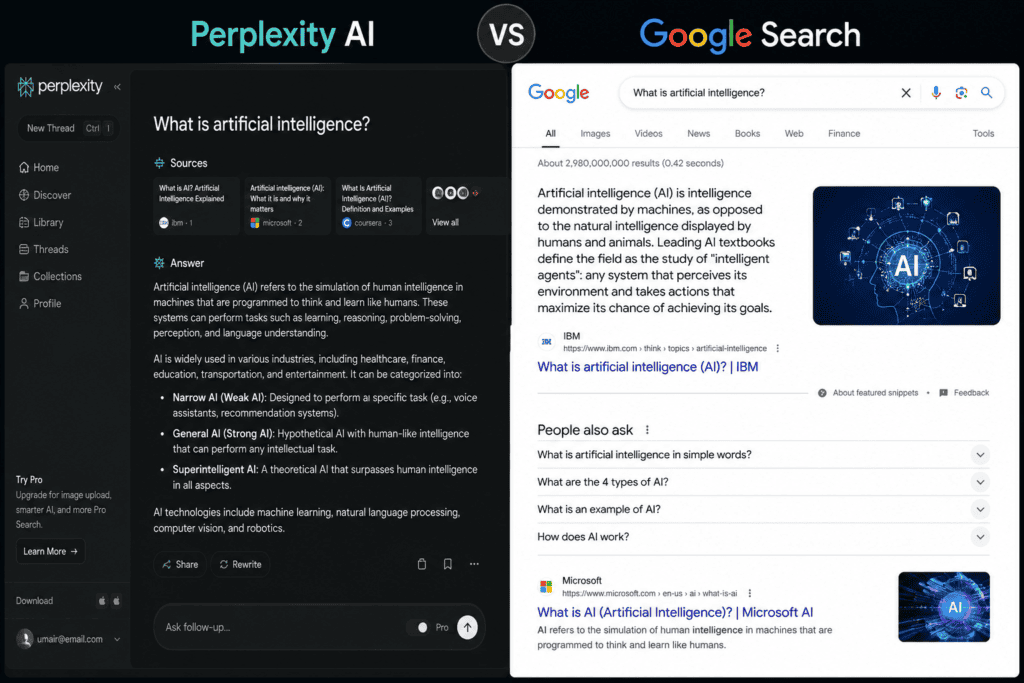
Perplexity is designed around synthesized answers.
If I give it a research question, I can often get a concise overview rather than opening ten pages.
Google can sometimes provide snippets, knowledge panels, or AI-generated search features depending on query and availability, but traditional search still requires more manual reading.
Winner: Perplexity
Which Is Better for Academic Research?
Google has the broader ecosystem for academic discovery.
Researchers can use:
- Google Scholar
- University websites
- Research repositories
- Journal websites
- Institutional reports
Perplexity can be helpful for understanding a research topic and locating relevant papers.
For example:
What are the major studies on AI-assisted writing published recently?
That can provide a useful starting point.
But for serious academic work, always examine the original paper.
Winner: Google
Perplexity AI vs Google Search for Current Information
This category depends heavily on the type of current information.
For breaking news, Google provides access to news publishers and current search results.
Perplexity can synthesize recent information quickly and cite sources.
If something happened today, I wouldn’t rely on a single AI-generated summary.
I’d check multiple recent sources.
For fast-moving subjects:
Search → compare → verify
is safer than simply accepting the first answer.
Winner: Tie
Which Is Better for Product Research?
Suppose you’re writing:
Best free AI design tools for small businesses.
You might need:
- Current pricing
- Free-plan limits
- Features
- Integrations
- User reviews
- Alternatives
Perplexity can quickly compare several tools.
Google is excellent for checking official pricing pages and product documentation.
This is another situation where combining both tools makes sense.
Winner: Both
Perplexity AI vs Google Search for Finding Expert Opinions
Google has the advantage of breadth.
You can search for:
- Interviews
- Podcasts
- LinkedIn posts
- Industry reports
- Reddit discussions
- Articles
- YouTube videos
Perplexity can help summarize those perspectives.
But summaries can flatten nuance.
An expert’s actual words may contain qualifications that disappear in a short AI summary.
So for important opinions, open the original source.
Winner for discovery: Google
Winner for synthesis: Perplexity
Which Is Better for Content Briefs?
Perplexity can be particularly useful here.
You can ask:
Create a research brief for an article about free AI writing tools. Include the main subtopics, important questions, common misconceptions, useful statistics, and sources to investigate.
That can give you a strong starting point.
Then you can turn the research into:
- H1
- H2s
- FAQs
- Supporting points
- Examples
Google can support the same workflow, but requires more manual organization.
Winner: Perplexity
Perplexity AI vs Google Search for Researching 10 Articles
This is where workflow efficiency becomes important.
Suppose you need to research 10 articles.
Using Google alone, you might create dozens of tabs.
That can quickly become messy.
Perplexity can help create an initial research summary for each topic.
Then use Google to verify important sources.
This approach reduces the amount of repetitive searching.
A practical workflow is:
Topic
↓
Perplexity overview
↓
Identify claims
↓
Google verification
↓
Primary sources
↓
Research notes
↓
Article
This is considerably more efficient than treating either tool as your only research source.
Can Perplexity Replace Google Search?
For some research tasks, it can reduce how often you need traditional search.
But I wouldn’t completely replace Google.
Google is still extremely useful for:
- Navigational searches
- Official websites
- Specific documents
- Local information
- News discovery
- Broad source discovery
- Search-result analysis
- Search operators
Perplexity is better viewed as a complementary research tool.
Can Google Search Replace Perplexity?
Yes, technically.
You can perform almost any research task manually through Google.
But you’ll spend more time synthesizing the information yourself.
That’s the main convenience Perplexity provides.
It reduces the distance between:
Search results
and
Understanding
Best Perplexity Prompts for Content Research
Here are practical prompts content creators can use.
Topic overview
Give me a beginner-friendly overview of [topic]. Identify the major concepts I should understand before writing about it.
Research brief
Create a research brief for a 2,500-word article about [topic]. Include important subtopics, common questions, recent developments, and credible sources to investigate.
Statistics
Find recent statistics about [topic]. Provide the original source for every statistic and prioritize primary research.
Counterarguments
What are the strongest criticisms or limitations of [topic]? Support each major claim with sources.
Expert research
Find recent expert opinions about [topic] and summarize the main points. Include links to the original sources.
Competitor research
Analyze the major themes covered by leading articles about [topic]. Identify topics that appear frequently and areas that may be underserved.
Fact-checking
Check these claims individually. For each claim, tell me whether reliable sources support it and provide the strongest available source.
These prompts turn Perplexity from a simple question-answering tool into a research assistant.
Best Google Search Techniques for Content Creators
Google becomes much more powerful when you stop searching only with normal phrases.
Try search operators.
Exact phrase
Use quotation marks:
“AI writing tools”
Specific website
site:gov AI statistics
Specific file type
AI marketing report filetype:pdf
Exclude a term
AI writing tools -QuillBot
Find a specific type of page
site:edu artificial intelligence research
These techniques give you much more control over the research process.
How to Combine Perplexity and Google Search
This is my preferred approach for serious content research.
Step 1: Start with Perplexity
Ask for an overview.
Don’t immediately ask it to write the article.
Your goal is understanding.
Step 2: Extract research questions
Look at the response and identify:
- Claims
- Statistics
- Names
- Dates
- Products
- Studies
Step 3: Verify with Google
Search the important claims independently.
Step 4: Visit primary sources
Don’t stop at summaries.
Open the:
- Report
- Research paper
- Official announcement
- Documentation
- Company page
Step 5: Build your outline
Organize the verified information into sections.
Step 6: Write
Use your own structure and explanation.
Step 7: Fact-check again
Before publishing, verify statistics, prices, dates, and current product information.
This workflow gives you both speed and reliability.
Mistakes to Avoid When Using AI for Research
AI research can save time, but it creates new risks.
Mistake 1: Trusting summaries blindly
An AI summary is not a substitute for the original source.
Mistake 2: Using outdated information
Tools and pricing change.
Always verify current details.
Mistake 3: Copying AI-generated claims
Check every important claim.
Mistake 4: Ignoring source quality
A blog post isn’t necessarily as authoritative as an official report.
Mistake 5: Using one source
Important claims should be cross-checked.
Mistake 6: Confusing citations with verification
A citation doesn’t automatically mean the claim is accurate.
Open the source.
Read the relevant section.
Compare the information.
Perplexity AI vs Google Search for Human-Looking Content
If you’re trying to write content that feels human, research quality matters.
One reason AI-generated articles often feel generic is that the writer doesn’t have enough original research.
Good research gives you:
- Specific examples
- Real statistics
- Relevant cases
- Contrasting opinions
- Useful details
Instead of writing:
AI tools are becoming increasingly popular.
you might write something more informative based on verified research.
The goal isn’t simply to make AI text “sound human.”
The goal is to make the content genuinely useful.
Which Tool Is Better for Bloggers?
For bloggers, I’d use both.
Use Perplexity to:
- Understand topics
- Generate research questions
- Summarize sources
- Discover angles
- Build initial briefs
Use Google to:
- Find primary sources
- Check current information
- Analyze search results
- Research competitors
- Verify claims
Best blogger workflow:
Perplexity + Google
Which Tool Is Better for Freelance Writers?
Freelancers often need speed.
If a client sends a topic you’ve never covered, Perplexity can help you get up to speed quickly.
You can spend less time figuring out basic terminology and more time researching the important details.
Google remains essential for finding authoritative sources.
Winner: Combination
Which Tool Is Better for SEO Content Writers?
SEO writers should use Google heavily because Google Search itself reveals what the search ecosystem looks like.
Look at:
- Search results
- Related searches
- People Also Ask
- Competitor pages
- Search intent
- SERP features
Use Perplexity to understand the subject and identify content gaps.
Winner: Combination
Which Tool Is Better for Social Media Managers?
Perplexity can be useful when researching:
- Trends
- Industry topics
- Statistics
- Audience questions
- Campaign ideas
Google is useful for validating current information and finding source material.
For social media content involving news or statistics, verification is particularly important.
Winner: Combination
Perplexity AI vs Google Search: Pros and Cons
Perplexity Pros
- Fast research summaries
- Conversational workflow
- Follow-up questions
- Citations
- Excellent for topic overviews
- Useful for research briefs
- Reduces tab overload
- Good for synthesizing information
Perplexity Cons
- Summaries can oversimplify
- Important claims still require verification
- Source quality varies
- AI responses can contain mistakes
- Less control than traditional search for some specialized queries
Google Search Pros
- Massive search ecosystem
- Excellent source discovery
- Strong navigational search
- Great for primary sources
- Search operators
- Excellent competitor research
- Useful for current information
- Direct access to original pages
Google Search Cons
- More manual research
- Many tabs
- Requires more synthesis
- Search results can include low-quality content
- Information overload
Final Verdict: Perplexity AI vs Google Search
So, which is faster for content research?
Perplexity AI is generally faster for understanding a topic.
Google Search is generally better for exploring and verifying the web.
If your task is:
“Give me a quick overview of this subject.”
Choose Perplexity.
If your task is:
“Find the official report published by this organization.”
Choose Google.
If your task is:
“Research this topic thoroughly for a 3,000-word article.”
Use both.
A good content research workflow isn’t about finding the one magical AI tool that does everything.
It’s about reducing wasted time without sacrificing accuracy.
Start with Perplexity to map the topic.
Use its citations to discover useful sources.
Then switch to Google when you need to investigate specific websites, primary documents, competitors, statistics, and current information.
Finally, open the important sources yourself.
Read them.
Take notes.
Cross-check claims.
Then write.
That’s how AI can make research faster without turning your content into another generic AI-generated article.
The biggest productivity gain doesn’t come from letting AI do all the research.
It comes from letting AI handle the first layer of research, while you remain responsible for the important layer of verification and judgment.
For content creators, that distinction is critical.
Overall winner for speed: Perplexity AI
Overall winner for source discovery: Google Search
Overall winner for verification: Google Search
Overall winner for research summaries: Perplexity AI
Best solution for serious content research: Perplexity + Google Search
Frequently Asked Questions
Is Perplexity faster than Google Search?
For many research questions, Perplexity can feel faster because it summarizes information and presents citations in one response. Google is often faster for finding a specific website, official page, document, or source.
Is Perplexity better than Google for blog research?
Perplexity is excellent for building an initial research overview and identifying topics, questions, and sources. Google remains valuable for verifying claims and finding primary sources.
Can Perplexity replace Google Search?
It can replace some traditional searches, particularly informational research, but Google remains useful for navigation, source discovery, current information, official websites, and detailed web exploration.
Can Google Search replace Perplexity?
Yes, but you’ll usually need to spend more time reading and synthesizing information yourself. Perplexity’s main advantage is reducing that synthesis time.
Is Perplexity good for SEO research?
Yes. It can help understand topics, identify questions, brainstorm content angles, and research competitors. Google should still be used to analyze actual search results and search intent.
Which is better for finding statistics?
Both can help locate statistics. Perplexity can find and summarize them quickly, while Google can be particularly useful for locating the original report. Always verify statistics against the primary source.
Which is better for academic research?
Google and Google Scholar provide broad access to academic and institutional sources. Perplexity can help discover and understand research, but the original paper should always be consulted for important claims.
Should I trust Perplexity citations?
Citations are useful starting points, but you should open the cited source and confirm that it actually supports the statement made in the answer.
Can Perplexity write a complete blog post?
It can help generate content, but using it primarily as a research assistant is often more useful. Original analysis, examples, expert sources, and human editing can make the final article more valuable.
Is Google Search still useful with AI search tools?
Absolutely. AI search and traditional search solve different problems. Google remains extremely useful for finding specific sources, official websites, documents, competitors, news, and diverse perspectives.
What is the fastest research workflow for bloggers?
A practical workflow is:
Perplexity for topic discovery → Google for source verification → primary sources for evidence → human analysis → final article.
This gives you speed without relying entirely on AI-generated summaries.
Checkout here if you want to know about Gamma AI vs Tome App: Best Free AI Presentation Tool for Students